
Google announced that Android’s Quick Share can now send and receive files with Apple’s AirDrop, starting with the Pixel 10. This update lets users share photos, videos, and other files between Android and Apple devices without needing extra apps or cables.
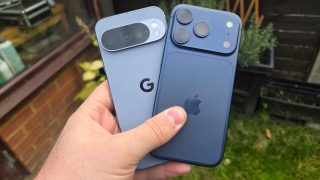
When an Android user opens Quick Share, nearby Apple devices will appear as sharing options as long as AirDrop’s “Everyone for 10 minutes” mode is turned on. The iPhone, iPad, or Mac user must accept the request before the file is received. The same process also works the other way—from Apple to Android.
Google says the feature uses a direct, peer-to-peer connection. This means the shared files do not pass through any server, and no extra data is collected. Google also shared that Apple was not a partner in building this feature. Instead, Google used its own method, but it is open to working with Apple in the future, especially to support AirDrop’s “Contacts Only” mode.
To activate the feature, Pixel 10 users must update the “Quick Share Extension” through the Google services menu in Settings and restart their phone.
Google added that the connection is protected by multiple layers of security from both Android and iOS. Users will still need to manually approve every file sent to their device, giving them control over what they accept.
This update aims to make sharing easier for people, no matter what phone they use.




0 Comments
Leave a Reply