

HUAWEI MatePad 12 X (2026) Review



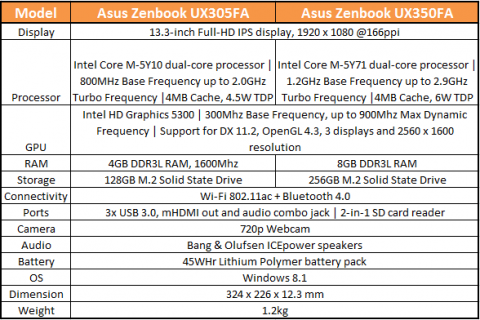
The Asus Zenbook UX305 just arrived in the Philippines last month, and it’s a really an interesting device as it’s beautiful, fairly affordable, and running on Intel’s recently released Core M CPU.
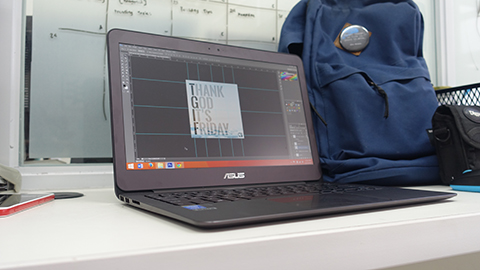
We were given around a few days to a week to play around with the Asus ZenBook UX305, and I was able to use it as my work laptop. It’s light, thin and well-powered that I always forget that I have an actual laptop inside my small bag.
Watch our video below for a more detailed look.

During my days at the office, I was able to run Photoshop and a few more games like Heroes of The Storm & Hearthstone to no sweat (and the laptop starts to get warm below the screen). I was also able to open lots of tabs in the Chrome browser too, but the common problem was in handling high-res files. Copying and pasting photos to Powerpoint proved a little too much for the Zenbook, and playing around with Canva and 2000+ px files in Photoshop cause the laptop to stutter.
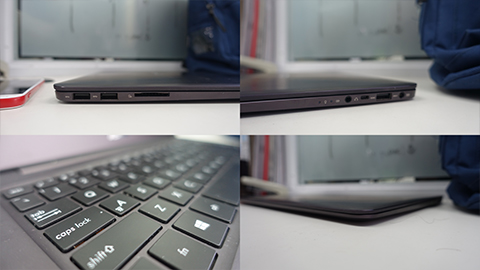
However, on the bright side, I never even got to extremely low battery levels doing these simple tasks. At the end of the day, I still have enough juice for a little more (without gaming and not using high-performance mode).
[fancygallery id=”220″ album=”263″]
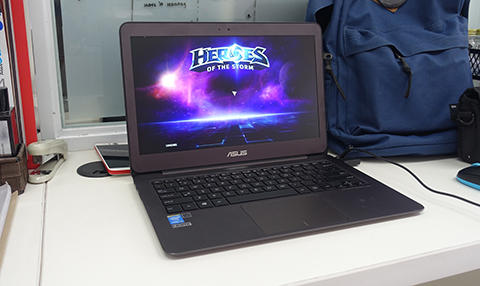
Aside from the speakers and the lack of a good trackpad and a backlit keyboard, we had no other gripes with the Zenbook UX305. At a price of just Php34,995, the laptop proves that it’s actually a great buy.
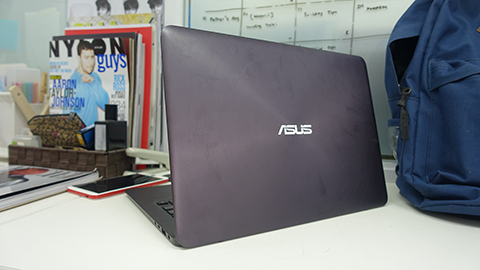
What we liked about it:
What we didn’t like about it:










Apple, Asus, Cherry Mobile, Huawei, LG, Nokia, Oppo, Samsung, Sony, Vivo, Xiaomi, Lenovo, Infinix Mobile, Pocophone, Honor, iPhone, OnePlus, Tecno, Realme, HTC, Gionee, Kata, IQ00, Redmi, Razer, CloudFone, Motorola, Panasonic, TCL, Wiko
Best Android smartphones between PHP 20,000 - 25,000
Smartphones under PHP 10,000 in the Philippines
Smartphones under PHP 12K Philippines
Best smartphones for kids under PHP 7,000
Smartphones under PHP 15,000 in the Philippines
Best Android smartphones between PHP 15,000 - 20,000
Smartphones under PHP 20,000 in the Philippines
Most affordable 5G phones in the Philippines under PHP 20K
5G smartphones in the Philippines under PHP 16K


fifi says:
🌱 Noobs🏆1
what’s the price of the 350?
Mr A says:
🥉 Rookie🏆1
A HD screen, solid state drive for 34K? That’s a great deal. You can just buy a mouse for the trackpad and attach a bluetooth speaker or headphones for the speaker. Touch in a laptop isn’t deal breaking either.
Joeyoliver says:
🌱 Noobs🏆1
Theres actually no ux350 version. The 2nd model seems like a typo. It should also be ux305.
arcs says:
🌱 Noobs🏆1
Can this device handle 3d modeling programs or other design programs? Or how about to it’s 8gb ram version?
happymonkey says:
🌱 Noobs🏆1
Very unlikely.. just like the reviewer said.. just toying with high res photos makes the device stutter. what more if you are modeling/rendering in 3d..
Intel M is not a powerful processor for heavy computing.
arcs says:
🌱 Noobs🏆1
Thanks a lot, I guess that would be relatively the same performance with the 8gb ram version. can you suggest a laptop that suits doing these kind of works?
Arki says:
🌱 Noobs🏆1
ASUS ROG G501
happymonkey says:
🌱 Noobs🏆1
any gaming laptop will do..
since you need an i7 processor, RAM of 8GB++, and a dedicated NVDIA gpu..
for the processor watch for the anything with a U on its model like, i7-5500U. it’s possibly slower than other i7 models.
arcs says:
🌱 Noobs🏆1
I see… I actually, interested of getting this ux305, cause its very portable and nice looking as well, though yeah I’m a bit concern about it’s performance for the task I’m doing. Thanks for the tip guys!
Mike says:
🌱 Noobs🏆1
Where can we get this at this Price? Checked Villman and they’re selling it at almost 47k…
Tristan says:
🌱 Noobs🏆1
UX305 Intel Core M-5Y71 & 8GB RAM (46,995)
UX305 Intel Core M-5Y10 & 4GB RAM (34,995)
Dennis says:
🌱 Noobs🏆1
Actually got mine this morning and the price tag is 53K. Was surprised with the price and I got it from the office meaning distributor price.
Should’ve gotten a mac air instead. Sigh
Nikki says:
🌱 Noobs🏆1
where is it available now?