infinix x yugatech

Asus ZenBook UX305 Review

Listen to article

The Asus Zenbook UX305 just arrived in the Philippines last month, and it’s a really an interesting device as it’s beautiful, fairly affordable, and running on Intel’s recently released Core M CPU.
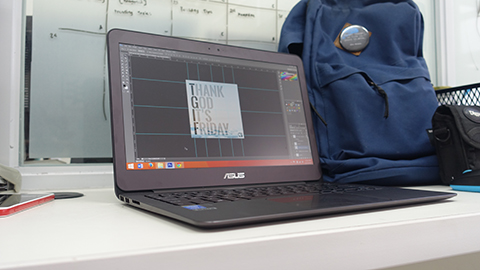
ASUS ZENBOOK UX305 (8)

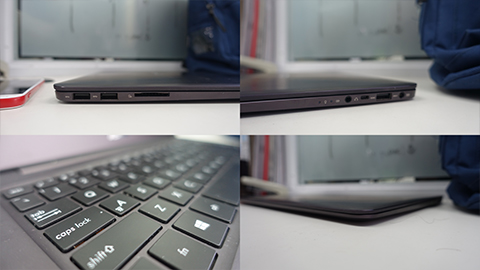
We were given around a few days to a week to play around with the Asus ZenBook UX305, and I was able to use it as my work laptop. It’s light, thin and well-powered that I always forget that I have an actual laptop inside my small bag.

Watch our video below for a more detailed look.

asus zenbook ux305 youtube

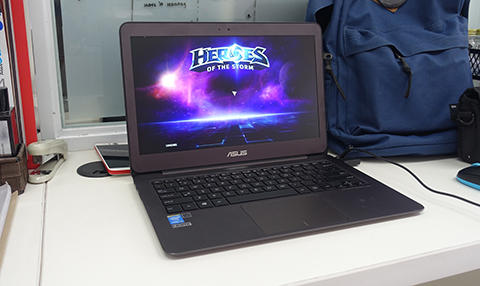
During my days at the office, I was able to run Photoshop and a few more games like Heroes of The Storm & Hearthstone to no sweat (and the laptop starts to get warm below the screen). I was also able to open lots of tabs in the Chrome browser too, but the common problem was in handling high-res files. Copying and pasting photos to Powerpoint proved a little too much for the Zenbook, and playing around with Canva and 2000+ px files in Photoshop cause the laptop to stutter.
ASUS ZENBOOK UX305 (3)

However, on the bright side, I never even got to extremely low battery levels doing these simple tasks. At the end of the day, I still have enough juice for a little more (without gaming and not using high-performance mode).

[fancygallery id=”220″ album=”263″]
ASUS ZENBOOK UX305 (9)

Aside from the speakers and the lack of a good trackpad and a backlit keyboard, we had no other gripes with the Zenbook UX305. At a price of just Php34,995, the laptop proves that it’s actually a great buy.

ASUS ZENBOOK UX305 (4)

What we liked about it:

  • Beautiful and lightweight design
  • Sharp and vibrant 1080p matte display
  • Complete with ports
  • Trackpad gestures
  • Affordable
  • Decent to great performance
  • Great battery life

What we didn’t like about it:

  • No touchscreen / bad trackpad clicking
  • No backlit keys
  • Subpar speakers
  • Gets warm when doing heavy tasks

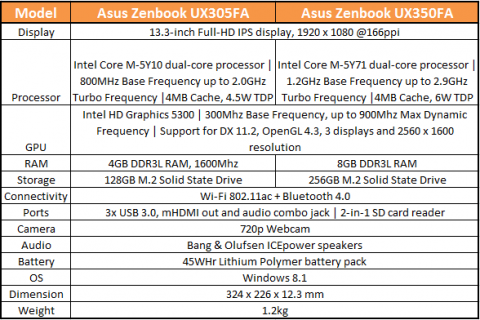
zenbook ux305 specs

React to this article:
Written by
Bob Freking

Bob Freking

Writer

Bob Freking occasionally contributes articles to the website. He is a UST Graduate of Commerce & Business Administration, Major in Marketing Management, and a full-time Sith Lord with three dragons.

View all posts by Bob Freking →

26 Comments

NI
Nikki · 11 years ago

where is it available now?

Reply
DE
Dennis · 11 years ago

Actually got mine this morning and the price tag is 53K. Was surprised with the price and I got it from the office meaning distributor price.

Should’ve gotten a mac air instead. Sigh

Reply
MI
Mike · 11 years ago

Where can we get this at this Price? Checked Villman and they’re selling it at almost 47k…

Reply
TR
Tristan · 11 years ago

UX305 Intel Core M-5Y71 & 8GB RAM (46,995)
UX305 Intel Core M-5Y10 & 4GB RAM (34,995)

AR
arcs · 11 years ago

Can this device handle 3d modeling programs or other design programs? Or how about to it’s 8gb ram version?

Reply
HA
happymonkey · 11 years ago

Very unlikely.. just like the reviewer said.. just toying with high res photos makes the device stutter. what more if you are modeling/rendering in 3d..

Intel M is not a powerful processor for heavy computing.

AR
arcs · 11 years ago

Thanks a lot, I guess that would be relatively the same performance with the 8gb ram version. can you suggest a laptop that suits doing these kind of works?

AR
Arki · 11 years ago

ASUS ROG G501

HA
happymonkey · 11 years ago

any gaming laptop will do..
since you need an i7 processor, RAM of 8GB++, and a dedicated NVDIA gpu..

for the processor watch for the anything with a U on its model like, i7-5500U. it’s possibly slower than other i7 models.

AR
arcs · 11 years ago

I see… I actually, interested of getting this ux305, cause its very portable and nice looking as well, though yeah I’m a bit concern about it’s performance for the task I’m doing. Thanks for the tip guys!

JO
Joeyoliver · 11 years ago

Theres actually no ux350 version. The 2nd model seems like a typo. It should also be ux305.

Reply
MR
Mr A · 11 years ago

A HD screen, solid state drive for 34K? That’s a great deal. You can just buy a mouse for the trackpad and attach a bluetooth speaker or headphones for the speaker. Touch in a laptop isn’t deal breaking either.

Reply
FI
fifi · 11 years ago

what’s the price of the 350?

Reply

Leave a Reply

Loading next article...