










Apple, Asus, Cherry Mobile, Huawei, LG, Nokia, Oppo, Samsung, Sony, Vivo, Xiaomi, Lenovo, Infinix Mobile, Pocophone, Honor, iPhone, OnePlus, Tecno, Realme, HTC, Gionee, Kata, IQ00, Redmi, Razer, CloudFone, Motorola, Panasonic, TCL, Wiko
Best Android smartphones between PHP 20,000 - 25,000
Smartphones under PHP 10,000 in the Philippines
Smartphones under PHP 12K Philippines
Best smartphones for kids under PHP 7,000
Smartphones under PHP 15,000 in the Philippines
Best Android smartphones between PHP 15,000 - 20,000
Smartphones under PHP 20,000 in the Philippines
Most affordable 5G phones in the Philippines under PHP 20K
5G smartphones in the Philippines under PHP 16K
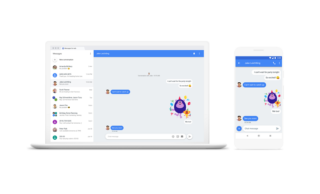
Google has launched new features for its Android Messages app which includes Messages for Web. Messages for Web basically lets you send and receive texts from your PC. To get started, go to messages.android.com on your web browser. Open the Messages app on your phone, tap the More options menu, select "Messages for web", then scan the QR code with your phone. The feature is rolling out to users starting today so make sure to keep your Android Messages app updated. For more information, check out Android's official developer's blog here. Every once in a while, I'd receive text messages or emails from bloggers and website owners asking for advice whenever their site is hacked. A lot of government websites have been hacked in the past because their webmasters are so fond of installing the forum script phpBB yet do not update them for months or even years. Read more in our articles including "Google launches Messages for Web" and "Google previews Android 12L for tablets, foldables, ChromeOS devices".
Google has launched new features for its Android Messages app which includes Messages for Web.…
Jun 19, 2018
Google has just announced a new version of Android 12 that is catered to larger…
Oct 28, 2021Maybe this is what Google wanted all along — for every small-time phone manufacturer not…
Dec 5, 2008Every once in a while, I’d receive text messages or emails from bloggers and website…
Jun 7, 2007
Google Photos is rolling out new video editing tools that make creating highlight videos much…
Dec 11, 2025
Adobe just made creative work a lot easier. Starting today, you can use Photoshop, Adobe…
Dec 11, 2025Google has launched new features for its Android Messages app which includes Messages for Web. Messages for Web basically lets you send and receive texts from your PC.
To get started, go to messages.android.com on your web browser. Open the Messages app on your phone, tap the More options menu, select "Messages for web", then scan the QR code with your phone. The feature is rolling out to users starting today so make sure to keep your Android Messages app updated.
Our coverage of android messages for web includes: "Google launches Messages for Web"; "Google previews Android 12L for tablets, foldables, ChromeOS devices"; "Sciphone goes for Android Dream 2". Each article provides unique insights and information.