

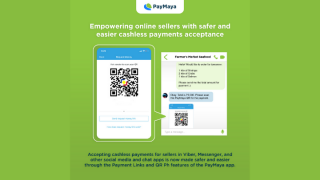
PayMaya has recently rolled out the new Payment Links and QR Ph features in its app. The Payment Links feature allows any PayMaya user with an upgraded account to generate a request money link that already integrates the amount that their buyer needs to pay for faster and more convenient transactions. PayMaya's QR Ph-enabled code, however, lets sellers instantly receive payments from other PayMaya users or from 18 other banks and financial institutions currently participating in the QR Ph initiative of the Bangko Sentral ng Pilipinas (BSP) via InstaPay. On the other hand, buyers only need to tap on the seller's link or scan or upload the seller's QR Ph code through the PayMaya app to make a payment. The seller's PayMaya account details will automatically be filled in on their PayMaya app, and they can enter the amount or press "Pay" for faster and easier payments. Furthermore, they also have a chance to earn PHP 100 for every PHP 25,000 worth of accumulated payments received via their PayMaya account, or up to PHP 400 for a maximum of PHP 100,000 worth of accumulated payments. Read more in our articles including "PayMaya rolls out Payment Links, QR Ph features" and "Gmail now converts email address, phone numbers, and contacts to hyperlinks".
PayMaya has recently rolled out the new Payment Links and QR Ph features in its…
Feb 9, 2021
Google has updated its Gmail by converting email addresses, phone number, and contacts to hyperlinks.…
Sep 19, 2017Belkin Philippines, together with Pismo Digital Lifestyle Inc., officially launches the new Linksys WRT-1900ac router…
Sep 17, 2014
Zoom has introduced ZoomMate, a new AI-powered work platform designed to help teams turn conversations…
Jun 20, 2026
The Philippine Atmospheric, Geophysical and Astronomical Services Administration (PAGASA) has launched the PANaHON mobile app,…
Jun 16, 2026
EStrava has announced a set of new and updated hiking features aimed at helping users…
Jun 13, 2026PayMaya has recently rolled out the new Payment Links and QR Ph features in its app. The Payment Links feature allows any PayMaya user with an upgraded account to generate a request money link that already integrates the amount that their buyer needs to pay for faster and more convenient transactions.
PayMaya's QR Ph-enabled code, however, lets sellers instantly receive payments from other PayMaya users or from 18 other banks and financial institutions currently participating in the QR Ph initiative of the Bangko Sentral ng Pilipinas (BSP) via InstaPay. On the other hand, buyers only need to tap on the seller's link or scan or upload the seller's QR Ph code through the PayMaya app to make a payment. The seller's PayMaya account details will automatically be filled in on their PayMaya app, and they can enter the amount or press "Pay" for faster and easier payments.
Our coverage of PayMaya Payment Links includes: "PayMaya rolls out Payment Links, QR Ph features"; "Gmail now converts email address, phone numbers, and contacts to hyperlinks"; "Belkin PH brings Linksys WRT-1900ac locally". Each article provides unique insights and information.