

HUAWEI MatePad 12 X (2026) Review



MMC or Multimedia Cards come in different shapes and sizes, but the most commonly used one nowadays is the Secure Digital card or SD card for short. Most of these cards have labels or markings on them that would, for the trained eye at least, give a user an overview of an MMC’s feature set by merely glancing on it.
In this post, we’ll give you guys an overview on the six (6) markings that are often printed on an SD card’s label, what these symbols/values stand for and how it can help you in choosing the right SD card for your needs.

1. Storage Capacity – This is probably the most common marking that you’ll see on an SD card. This indicates the storage spaces that a certain card can hold. However, do note that as with all storage devices, expect that the actual (usable) storage space that you’ll get is lesser than the indicated capacity on the card.
2. Write-protect Logo – Another marking that you’ll usually see on an SD card is the write-protect symbol, often seen on the left side of the card with an accompanying arrow-down label. In order to use the SD card, make sure that the tiny lever is at the top of the symbol which signifies that it’s unlocked and is not write-protected.

3. Read Speed (claimed) – The number on the top left with a corresponding unit (oftentimes in megabytes per seconds) is the maximum read speed that the SD card can spit out based on the manufacturer’s internal testing.
Bear in mind that Read Speed is different from Write Speed. Manufacturers don’t usually indicate the latter as the SD card’s write speed is typically lower in value (meaning slower) compared to read speed. Another thing to remember is that the card maker was able to achieve the card’s indicated read speed in their internal testing by using a supported host device. As such, your mileage will vary depending on what device you’re using.
4. Format – Since the inception of SD cards nearly two decades ago, it has evolved to suit the consumer’s demand for faster storage accessories with larger storage capacity. With every new development, the SD Association creates a new format to standardize the next generation of SD card.
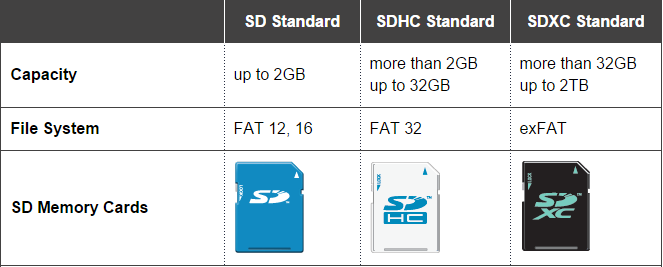
There are currently three SD formats – Secure Digital Standard Capacity (SDSC or just SD) that uses FAT 12/16 file systems and tops out at 2GB, Secure Digital High Capacity (SDHC) which makes use of FAT32 file system and supports up to 32GB memories, and Secure Digital Extreme Capacity (SDXC) that utilizes exFAT format and can go as high as 2TB.
5. Speed Class – Next up, we have the Speed Class marking which gives as a rough idea of the card’s minimum write speed performance and its compatibility with the host device. There are currently four (4) Speed Classes that is defined by the SD Association – Class 2, Class 4, Class 6, and Class 10.

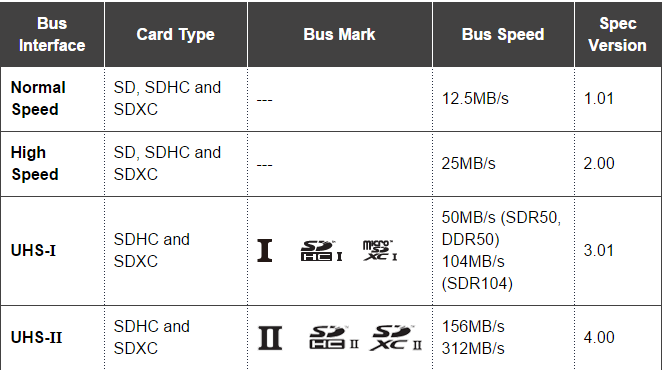
6. UHS Class – Rounding up our list of SD card markings is the Ultra High Speed or UHS Class. UHS is a class that the SD Association launched in 2009 which offers faster transfer rate for SDHC and SDXC and is intended for high resolution video recording.
There are two UHS classes right now; UHS Speed Class 1 (U1) and UHS Speed Class 3 (U3). Similar to Speed Class, the maximum speed of a UHS SD cards can only be achieved if the host device supports the UHS speed class. If it’s a non-UHS device, it will default back to Speed Class which explains why some SDHC and SDXC bears both speed class and UHS speed class markings on it.










Apple, Asus, Cherry Mobile, Huawei, LG, Nokia, Oppo, Samsung, Sony, Vivo, Xiaomi, Lenovo, Infinix Mobile, Pocophone, Honor, iPhone, OnePlus, Tecno, Realme, HTC, Gionee, Kata, IQ00, Redmi, Razer, CloudFone, Motorola, Panasonic, TCL, Wiko
Best Android smartphones between PHP 20,000 - 25,000
Smartphones under PHP 10,000 in the Philippines
Smartphones under PHP 12K Philippines
Best smartphones for kids under PHP 7,000
Smartphones under PHP 15,000 in the Philippines
Best Android smartphones between PHP 15,000 - 20,000
Smartphones under PHP 20,000 in the Philippines
Most affordable 5G phones in the Philippines under PHP 20K
5G smartphones in the Philippines under PHP 16K


v says:
🥉 Bronze🏆2
#3, write speed is kinda rare
sdcardduplication says:
🌱 Noobs🏆1
I cherished your blog. The potential is there for all. Marvelous recommendations for anyone and for superb SD CARDS SD Card Duplicators is right here to entertain you with originality of sounds and all.
Patrick says:
🌱 Noobs🏆1
Thank you so much, perfect layout