
Lenovo Tech World, Beijing, China — Lenovo has announced that they have collaborated with Microsoft to integrate REACHit – Lenovo’s cross platform file manager, and Cortana – Microsoft’s personal assistant for Windows, to boost productivity on Lenovo PCs and tablets running Windows 10.
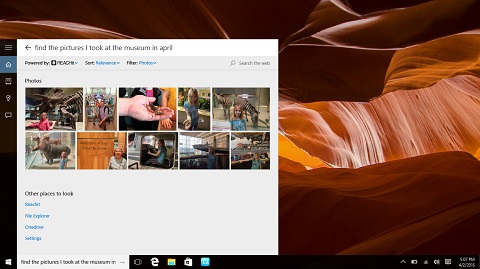
Cortana and REACHit key features:
* Allows users to search for photos, videos, documents and music across devices, including Google Drive, Dropbox, Box, OneDrive, PCs and tablets
* Gives users the ability to add location to searches, cross-referencing the file event with the location data to produce the most relevant results
* Cortana and REACHit works on Lenovo PCs and tablets running Windows 10.
* Since Lenovo and Microsoft collaborated on this project, this results in a seamless, enhanced Cortana search experience
* A single place to search for your content, whatever it is and wherever it may be:
~ Support for cloud storage providers like OneDrive, Google Drive, Dropbox, and Box
~ Support for email services like Gmail, Exchange, and IMAP
~ Support for calendar services like Exchange, Outlook.com, and Google Calendar
~ Support for search across multiple Windows 10 devices
* The most natural search – express your search as you would normally speak it, based on what you can remember
* Contextual awareness enables you to search in ways you never thought possible

- Lenovo Smart Shoes — cloud-based sports shoes
- Lenovo Magic View — world’s first smartwatch with dual display
- Lenovo ThinkPad 10 officially announced
- Lenovo Cast: wireless hub for smartphones and tablets
- Lenovo Outs Three Affordable Laptops






0 Comments
Leave a Reply