

Google has started rolling out a new Bluetooth diagnostics tool for Pixel phones to help users check and fix connection problems. The feature is part of an update to the Pixel Troubleshooting app and is now available on supported devices.
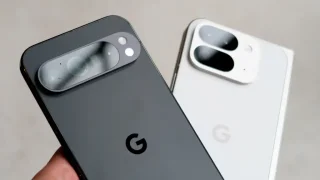
Users can find the new tool by going to Settings and looking for “Bluetooth diagnostics.” It can also be accessed through the device support section. The feature helps identify issues when connecting to Bluetooth devices like earbuds, smartwatches, or car systems.
Once activated, the tool runs a test, sometimes during a phone call, to check if there are problems with the connection. After the test, it gives simple suggestions to fix the issue. These may include moving the device closer, restarting it, reconnecting it, or clearing its saved connection.
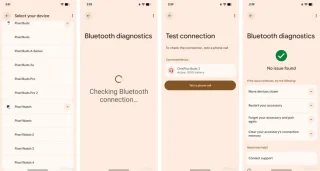
The Bluetooth diagnostics tool is one of several built-in checks on Pixel phones. Other tools include tests for touch, battery, temperature, and mobile connection.
The update means users no longer need to download third-party apps just to check Bluetooth issues. The feature is available across Pixel models, including older devices.
Other smartphone brands also offer similar tools. For example, some Samsung devices and iPhones have their own ways to check hardware, but Google’s new tool focuses on making Bluetooth troubleshooting easier for everyday users.





0 Comments
Leave a Reply