infinix x yugatech

Windows 11 では、Android をウェブカメラとして使用できるようになりました。

Listen to article

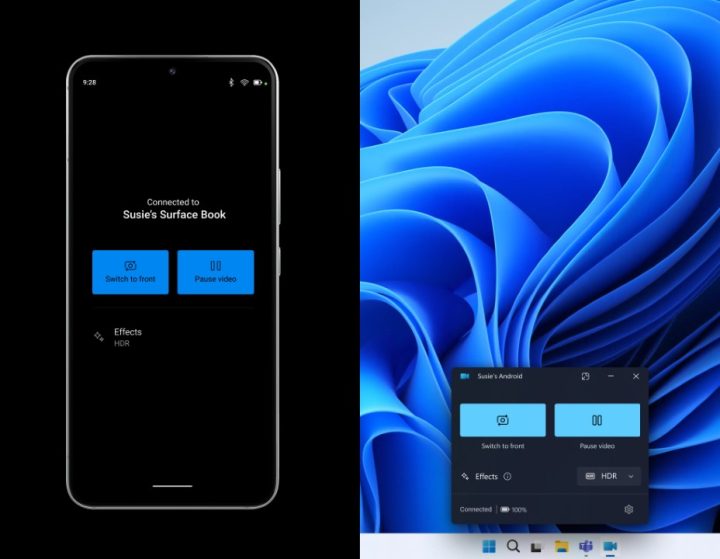
Microsoftは、Windows 11 インスライダー向けに、ユーザーがAndroidのスマートフォンやタブレットをビデオ通話用のウェブカメラとして設定できる新機能を展開しています。この機能は現在、すべてのインスライダーチャンネルで利用可能です。
Android Phone As Webcam Windows 11 Kv 1 (yuga Fi)

この機能を使用するには、Androidデバイス(Android 9.0以降を実行)とWindowsPCの両方に、Windowsアプリへのリンク(バージョン1.24012以上)がインストールされている必要があります。さらに、ユーザーはWindowsインサイダープログラムに登録されている必要があります。

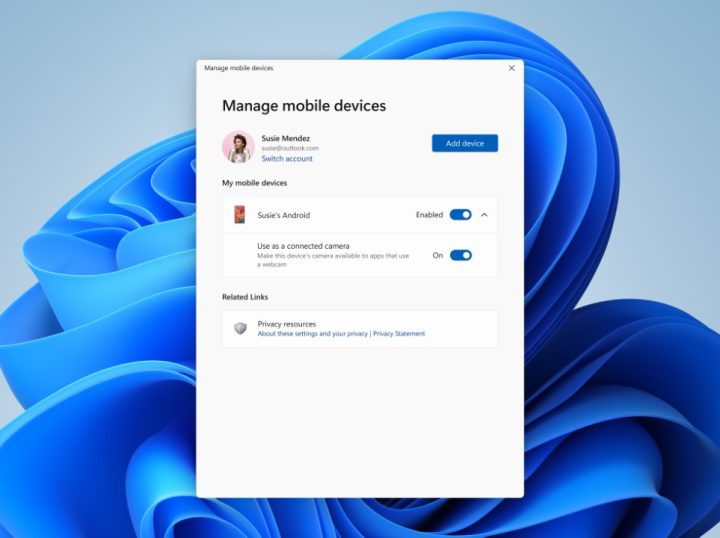
デバイスの接続は簡単なプロセスです。Windows PC で、「設定 > Bluetooth & デバイス > モバイルデバイス」に移動し、「デバイスの管理」を選択して、PC が Android デバイスへのアクセスを許可してください。
Android Phone As Webcam Windows 11 Kv (yuga Fi)

接続すると、ユーザーはさまざまなメリットを享受できます。Androidデバイスのビデオ通話中に、前面カメラと背面カメラを切り替えることが可能です。また、PC上でエフェクトの適用や、スマートフォンのカメラロールから最近撮影した写真へのアクセスといった機能を利用できる場合もあります。

現在はこの機能はインサイダー限定ですが、将来的にはすべてのWindows 11 ユーザーにこの機能を提供することを期待しています。

Link to Windows アプリは、iOS デバイスでも利用可能である点に留意すべきです。これにより、iPhone を Windows PC のウェブカメラとして使用できる可能性が浮上しています。ただし、Microsoft は現時点で iPhone ウェブカメラサポートに関する計画を確認していません。


React to this article:
Written by
JM Chavaria

JM Chavaria

Executive Producer

JM has always had an affinity for all things tech and gaming, even before joining YugaTech. He holds a bachelor’s degree in Journalism from the Polytechnic University of the Philippines (Manila). Since then, JM has been covering the tech industry for several years now through engaging news, reviews, and content creation. Specializing in video editing, writing, and videography, he pays close attention to visuals, spec sheet, and the rule of thirds. JM is also mainly a Nintendo guy, often bringing his modded 3DS XL with him wherever he goes whenever he can.

View all posts by JM Chavaria →

0 Comments

Leave a Reply

Loading next article...