infinix x yugatech

Windows 11 现已支持将 Android 手机用作网络摄像头

Listen to article

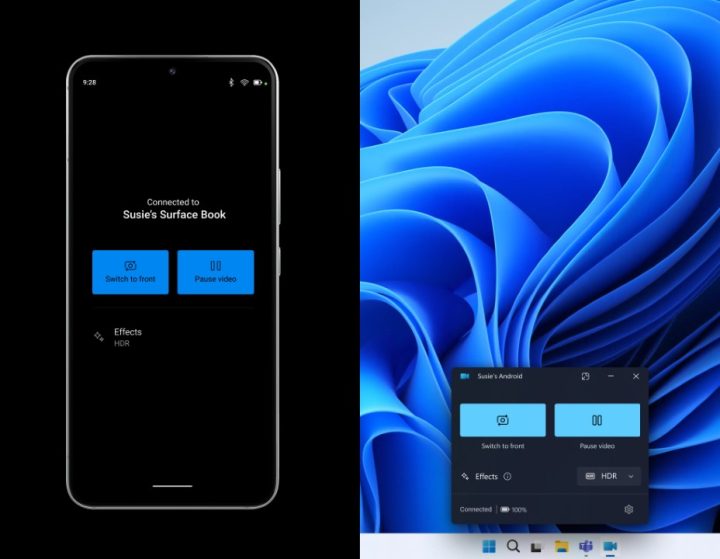
微软正在为 Windows 11 Insiders 推出新功能,允许用户将 Android 手机或平板电脑用作视频通话的网络摄像头。该功能目前已在所有 Insider 频道中提供。
Android Phone As Webcam Windows 11 Kv 1 (yuga Fi)

要使用此功能,Android设备(运行Android 9.0或更高版本)和Windows PC均需安装链接到Windows应用(版本1.24012或更高)。此外,用户还需加入Windows Insider计划。

连接设备是一个简单的过程。在 Windows 电脑上,依次进入 设置 > Bluetooth & 设备 > 移动设备,选择“管理设备”,然后授予该电脑对 Android 设备的访问权限。
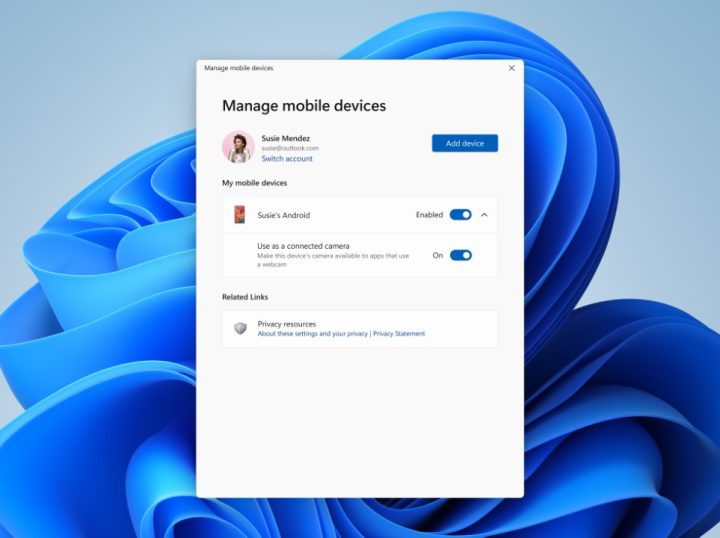
Android Phone As Webcam Windows 11 Kv (yuga Fi)

连接后,用户可享受多项便利。他们可在视频通话期间切换 Android 设备的前置和后置摄像头。此外,用户还可能获得诸如应用特效、直接从手机相册访问最近照片等功能的 PC 端支持。

虽然目前该功能仅限Insiders使用,但我们预计未来将向所有Windows 11用户开放此功能。

值得注意的是,Link to Windows 应用也适用于 iOS 设备(链接),这引发了将 iPhone 用作 Windows PC 网络摄像头的可能性。然而,微软目前尚未确认任何关于 iPhone 摄像头支持的计划。


React to this article:
Written by
JM Chavaria

JM Chavaria

Executive Producer

JM has always had an affinity for all things tech and gaming, even before joining YugaTech. He holds a bachelor’s degree in Journalism from the Polytechnic University of the Philippines (Manila). Since then, JM has been covering the tech industry for several years now through engaging news, reviews, and content creation. Specializing in video editing, writing, and videography, he pays close attention to visuals, spec sheet, and the rule of thirds. JM is also mainly a Nintendo guy, often bringing his modded 3DS XL with him wherever he goes whenever he can.

View all posts by JM Chavaria →

0 Comments

Leave a Reply

Loading next article...