

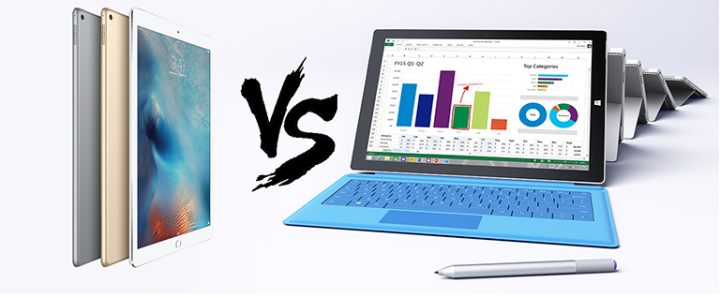
최근 iPad Pro가 출시되기 전까지 11 인치 이상 태블릿 시장은 Windows 기반 기기들이 장악하고 있었습니다. 하지만 이제 Apple의 가장 큰 태블릿이 등장했으므로, 태블릿 컴퓨팅 분야의 대표 주자인 Microsoft Surface Pro 3와 비교해 보겠습니다.
설계 및 시공
디자인은 주관적인 것이며, 항상 그랬습니다. 따라서 우리는 태블릿의 외관보다는 무게, 두께 및 화면-바디 비율과 같은 다른 측면을 기준으로 우승자를 선정하지는 않을 것입니다.이 점을 고려할 때, iPad Pro는 화면 대 바디 비율이 76.56%로 Surface Pro 3의 72.88%보다 우수하고, 더 큰 디스플레이임에도 불구하고 무게가 더 가벼운 (723g 대 768g) 데다 측면 두께도 7mm에 미치지 못할 정도로 얇아 Microsoft 태블릿이 9mm인 것과 비교해 이 부분에서 압도적인 우위를 점한다고 판단됩니다.
내부 구조
| Apple iPad Pro | Microsoft Surface Pro |
|---|---|
| 12.9 인치 LED 백라이트 멀티터치 디스플레이, 2732 x 2048 @ 264ppi | 12 인치 ClearType 풀 HD 디스플레이, 2160 x 1440 @ 216ppi |
| ⟦PH2X⟩ 64 비트 프로세서, M9 모션 코프로세서 | Intel Core i3-4020Y 또는 Intel Core i5-4300U 또는 Intel Core i7-4650U |
| ⟦PH7X⟩ RAM (TBC) | ⟦PH7X⟩ 또는 ⟦PH8X⟩ LPDDR3 RAM |
| ⟦PH9X⟩ 또는 ⟦PH10X⟩ 온보드 저장장치 | ⟦PH11X⟩, ⟦PH10X⟩, ⟦PH12X⟩ 또는 ⟦PH13X⟩ SSD, MicroSD 카드로 확장 가능 |
| 8 메가픽셀 자동초점 후면 카메라 | 5 메가픽셀 후면 자동초점 카메라 |
| 1.2 메가픽셀 전면 카메라 | 5 메가픽셀 전면 카메라 |
| 선택적 ⟦PH4X⟩ 연결성 | 선택적 ⟦PH4X⟩ 연결성 |
| ⟦PH1X⟩ 802.11ac, 2x2 MIMO | ⟦PH0X⟩ 4.2 | ⟦PH1X⟩ 802.11ac, 2x2 MIMO | ⟦PH0X⟩ 4.0 LE |
| 치수: 305.7 x 220.6 x ⟦PH14X⟩ | 무게: 713g | 치수: 292.1 x 201.4 x ⟦PH15X⟩ | 무게: 790g |
Apple는 새로운 A9X 프로세서에 대해 과감한 주장을 펼치며, 지난 6 개월 동안 출하된 휴대용 PC 중 80% 보다 빠르다고 자랑했습니다. Surface Pro 3 이 해당 그룹에 포함되는지, 그리고 Apple의 주장이 사실인지 여부는 아직 불확실하지만, iPad Pro 는 성능 면에서 Surface Pro 3 과 맞서기 위한 충분한 하드웨어를 갖추고 있습니다.
우리는 이를 확인하기 위해 벤치마크 테스트 결과를 기다려야 할 것 같습니다.
저장소
이전 섹션과 마찬가지로 성능 측면에서 iPad Pro의 저장 모듈이 Surface Pro 3에 탑재된 SSD만큼 광범위하다고 단정하기에는 아직 이릅니다.그러나 명확한 것은 저장 용량 측면에서 Surface Pro 3을 선택할 경우 iPad Pro보다 사용자가 더 많은 옵션을 선택할 수 있다는 점입니다. 비교를 위해 말하자면, iPad Pro는 32GB와 128GB의 두 가지 저장 용량만 제공되는 반면, Surface Pro 3의 저장 옵션은 64GB부터 256GB까지 다양하게 제공됩니다.
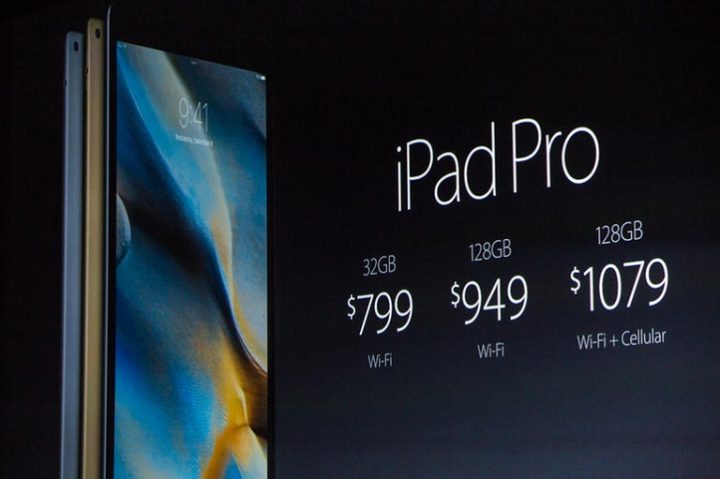
또 한 가지 지적할 점은 저장 용량 대비 가격입니다. iPad Pro의 기본 모델은 32GB의 저장 용량을 갖추고 있지만 가격은 $799입니다. 동일한 가격에 Surface Pro 3은 두 배의 저장 용량을 제공합니다.
마지막으로, Surface Pro 3은 microSD 카드를 통한 저장 공간 확장을 지원하며, 이는 iPad 프로 (또는 그 어떤 아이패드도 마찬가지) 에서는 누락된 기능입니다. 말할 나위 없이, 우리는 이 측면에서 전자가 더 나은 선택이라고 생각합니다.
디스플레이
만약 iPad 프로가 서피스 3 프로를 압도하는 한 가지 측면이 있다면, 그것은 바로 디스플레이 카테고리일 것입니다. 이는 후자의 화면이 끔찍하다는 뜻은 아닙니다. 단지 iPad 프로의 패널이 거의 모든 면에서 더 우수할 뿐입니다.
카메라
We've yet to personally see the kind of image quality the iPad Pro's rear camera can spit out, so we can't really tell which of the two contenders have the better snapper. However, by just plainly basing it on numbers, the iPad Pro has a better rear camera (8-megapixel) than the Surface Pro 3. The latter has a better front camera though (5-megapixel) compared to Apple's new tablet (1.2-megapixel).
다시 말해, 좋은 사진에는 화소 수 이상의 요소가 있으므로 어느 태블릿이 승자인지 단정할 수는 없습니다.
연결성 및 포트
무선 연결성 측면에서 Surface 3 Pro와 iPad Pro는 거의 동등하며, 두 태블릿 모두 Wi-Fi 802.11ac를 2x2 MIMO로 지원하고 데이터 활성화 모델에는 선택적 LTE 연결성을 제공합니다. iPad Pro는 Surface Pro 3(BLE 4.0) 대비 업그레이드된 Bluetooth(버전 4.2)를 탑재하고 있지만, 이로 인해 전자가 이 부분에서 승리한다고 보기에는 그리 중요하지 않습니다.중요한 점은 태블릿 간 포트 차이로, 이는 종종 간과되는 부분입니다. Apple의 '하나의 포트가 모든 것을 지배한다'는 신념에 따라 iPad Pro는 데이터 전송, 충전 및 물리적 연결이 필요한 거의 모든 액세서리 (오디오 관련 기기를 제외) 를 위한 단일 Lightning 커넥터만 제공합니다.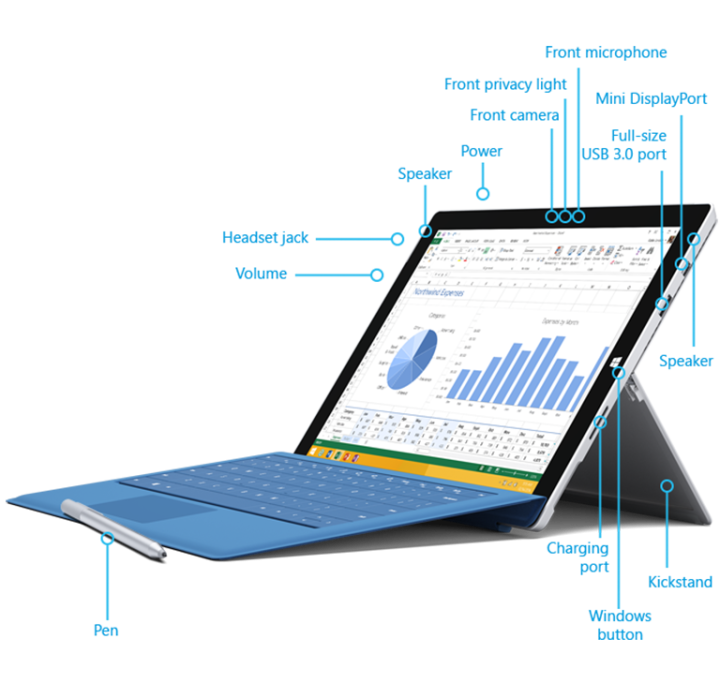
스펙트럼의 반대편에서는 Surface Pro 3이 다양한 기능을 수용할 수 있는 풍부한 포트들을 제공합니다. 데이터 전송을 위한 표준 USB 3.0 포트, 전용 충전 포트, microSD 카드 리더기(저장 공간 확장 슬롯으로도 사용됨), 그리고 Mini DisplayPort 출력이 포함되어 있습니다.
그러나 이러한 추가 포트는 Surface Pro 3의 디자인에서 일부 미적 점수를 깎아냅니다. 하지만 우리는 이미 iPad Pro에 대한 디자인과 제작을 평가했으며, 만약 실용성이 스타일보다 중요하다면 Surface Pro 3이 더 현명한 선택입니다.
소프트웨어
Like the design, the operating system is a matter of preference. We can’t say that one is better than the other since both iOS 9 and Windows 10 are good in their own regards. With that being said, we’ll stick with what we can work with: store and software selection
Although Microsoft has taken commendable efforts to further improve its store, we can safely say that it’s still leagues away from Apple’s App Store. On the other hand, the Surface Pro 3 offers a full desktop PC experience to users, which includes the ability to install desktop versions of supported third party apps on it (legit or otherwise) and not just mobile version which are oftentimes have limited features.
The bottom line is that if you’re fine with the wide selection of software on Apple’s App Store and if you’ve already invested on a lot of paid apps, the iPad Pro should be a no-brainer. However, if you’re more a PC user, the Surface Pro 3 should fit the bill.
Accessories
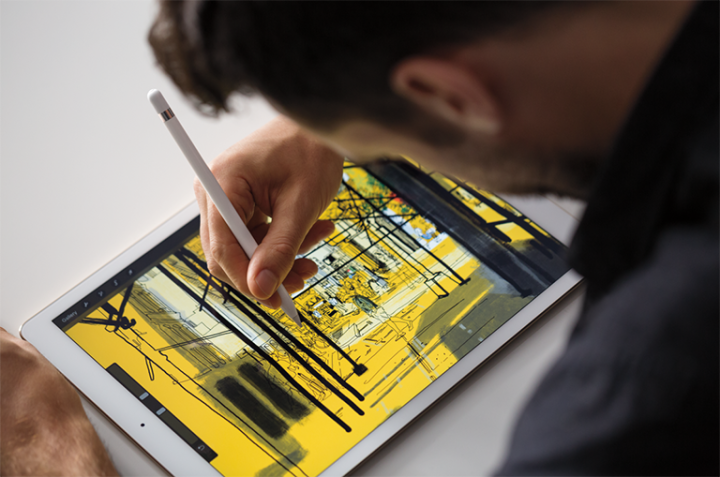
Along with the iPad Pro, Apple also announced two accessories for it, the Apple Pencil and Smart Keyboard. These accessories are not bundled with the new iPad Pro and have to be bought separately for $99 and $169 respectively.

While that also holds true for the Surface Pro 3, for the Type Cover at least, the Windows-powered tablet comes with a Stylus by default. One can make a valid argument that Surface Pro 3’s stylus isn’t as sophisticated as the Apple Pencil, but the fact remains that consumers won’t have to shell out a hundred bucks for a secondary input device.
As for the keyboard, well the Surface Pro 3’s Type Cover is $40 cheaper than Smart Keyboard for the iPad Pro.
Verdict
With everything taken in to consideration, we feel that the Microsoft Surface Store 3 is a more viable option compared to the iPad Pro. It offers more bang-for-the-buck thanks to its larger, not to mention expandable, on-board storage and pre-bundled stylus for the same price that Apple’s is asking for the iPad Pro. Not bad for a tablet that’s more than a year old than its competitor.
It should be noted, however, that these tablets cater to different kind of users. So despite the advantages that the Surface Pro 3 has over the iPad Pro, there will still be consumers who will go for the latter mainly for that extra screen real estate and the other features that it has to offer.



Dun sa conclusion mo sir, sana sinabi mo rin na others would go for the iPad Pro 3 just because it’s Apple. Hehe