infinix x yugatech

Microsoft unveils Project Spartan, the IE successor

Listen to article

Microsoft also announced in its press conference the successor to the legendary Internet Explorer, a new browser currently named as Project Spartan.
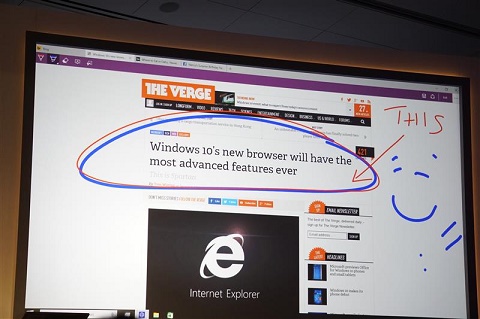
Project-Spartan

The new browser leading the Redmond giant’s newest operating system presents a more streamlined UI, focusing more on content that’s optimized on any device you’re using. Microsoft touts this as the best browser for distraction-free reading.

Note-taking tools and live annotations will also be a key feature in the new MS browser. Users can draw and highlight text on any space within the browser. This feature is not exclusive only to devices with touch and pen functions, as Microsoft aims to bring this to hardware with keyboards and mice as well.

Also a key feature, Microsoft’s personal digital assistant, Cortana, will be heavily integrated into Project Spartan. It will pop up along with necessary information depending on which website you are currently browsing, like offering maps, directions and menu when you browse along a restaurant’s website.

While the current internet browser has met its fate, Internet Explorer will still be available on technical preview of Windows 10 Enterprise version.

Photo: CNET

React to this article:
Written by
Carl Lamiel

Carl Lamiel

Writer

Get in touch with Carl at @lamielcarl on Twitter or visit his website for more updates!

View all posts by Carl Lamiel →

18 Comments

RO
Rockafella · 11 years ago

Pretty excited about it.

Reply
JO
jokab · 11 years ago

a fresh new look and feel for when downloading other browsers.

Reply
OM
Omar · 11 years ago

hahah. tama ka baka nga ganun din ang kalabasan..

TO
Tony · 11 years ago

Puro features lang naman ata ang nilagay sa project spartan na yan. Taz improvement sa UI? Speed or connection lang ang mali sa IE. Kung hindi nila naayos yun, how much more sa spartan.

Reply
VE
Vekou X Aitenshi · 11 years ago

“It will pop up along with necessary information depending on which website you are currently browsing” so parang Office assistant? Obtrusive.

Reply
IG
igniculus · 11 years ago

of course there will be an option to disable or to hide it. such negativities! gosh.

GR
gray · 11 years ago

as Microsoft aims to brings this to what?

Whaatt? It’s killing me!

Reply
IA
iamthor · 11 years ago

sir, di pa ata tapos magsulat,haha

CA
Carl Lamiel · 11 years ago

Sorry na. Apparently na-ctrl-Z habang nagsusulat ako. The annotation feature is also available for those with non-touch and pen input :)

Leave a Reply

Loading next article...