

HUAWEI MatePad 12 X (2026) Review



Gone are the days when we use a mouse with a physical ball under it. For the young readers here, you may even raise an eyebrow in confusion as to what I was referring to. This is because when you’re out to buy a peripheral mouse nowadays you’d only have to choose between an optical or a laser one. But for those who couldn’t seem to fully grasp how these two differ, check out our quick guide on whether an optical or laser mouse should be the right tool for you.

Before we begin defining the two, let’s first understand a basic technical term that would help us in this topic. When talking about a specific mouse, we always hear the term DPI. What is it, really?
DPI
DPI or dots per inch measures the sensitivity of the mouse. The higher the dpi count, the more sensitive it will be to small movements. A higher dpi also means more accuracy which is useful for gaming (like for aiming the gun in FPS titles, navigating menu, etc). In addition, it is useful for high-resolution displays like Full HD or UHD screens (with Dell just launching a slew of 4K and 5K resolution monitors) since the mouse will be sensitive enough to go end-to-end the screen, even when using multiple displays, without having to move your mouse across the entire table.
So does this mean a mouse with higher dpi is automatically better than that with lower dots per inch count? Not entirely. In contrast to using high-resolution displays, if you’re just on a 720p or lower resolution then it’s not wise to invest on an expensive mouse with high dpi since you won’t be able to utilize its features. Having a high count of dpi on a low-res screen will still be accurate, but will easily send your cursor flying away with little movement. You can compensate this by lowering the mouse sensitivity in the computer’s settings, but then again why would you get a highly-sensitive mouse if you’ll just limit it, right?
Now let’s get on with these two kinds of mice:
Optical

Logitech’s G400 optical gaming mouse
Optical mice use a couple of LED lights and a small camera to capture images of what’s underneath them and send data to the computer to register movement across the screen. This means that an optical mice can only be used on opaque surfaces. An ordinary optical mouse usually have around 200 – 800 dpi which is fine if you’re just on the Internet and casually using your computer. There are, however, gaming optical mice that offer up to 4000 dpi for better sensitivity and accuracy.
Laser
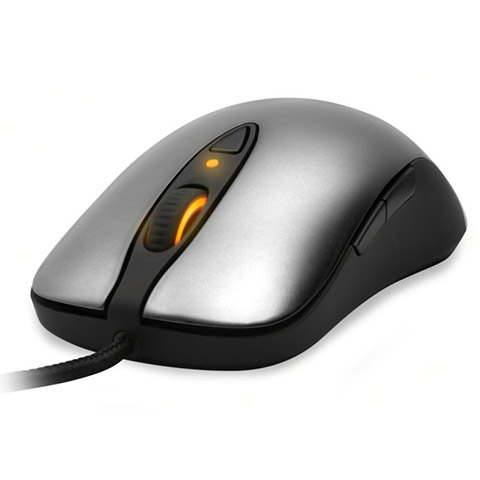
SteelSeries Sensei laser gaming mouse
Laser mice, on the other hand, is a newer technology that utilizes infrared laser lights and, unlike its optical cousin, it can be used on a wider range of surfaces like mirrors or glass tables. There are even special laser mice that claim to be able to register movement on almost any surface. These kinds also promise to be more accurate than its optical counterpart, with dpi reaching all the way to 8000+ (Rapoo’s ambidextrous V900 reaches 8200 dpi). It is also priced higher than most optical mice. Again, as we’ve mentioned earlier, higher dpi doesn’t equate to a better mouse.
So Which Mouse is for You?
Personally, I still prefer playing on an optical mouse with a decent dpi count (around 1200 – 2000 at the most) since I find it more stable and accurate. I recently used a laser gaming mouse and experienced the cursor to be a bit shaky when I try to aim for icons. This might just be my personal experience and doesn’t mean opticals are better than lasers — in the end it still boils down to your preference.
RELATED: First-ever smart gaming mouse with built-in heart rate monitor
To sum it up, the ideal mouse for you depends on the application or kind of game you’re playing (if you need a lot of accuracy and speed-scrolling), the resolution of the display you’ll use it on, and of course how you personally want your mouse to handle.
For the PC gamers out there, what mouse preference do you have in playing your games? We’re curious to know.










Apple, Asus, Cherry Mobile, Huawei, LG, Nokia, Oppo, Samsung, Sony, Vivo, Xiaomi, Lenovo, Infinix Mobile, Pocophone, Honor, iPhone, OnePlus, Tecno, Realme, HTC, Gionee, Kata, IQ00, Redmi, Razer, CloudFone, Motorola, Panasonic, TCL, Wiko
Best Android smartphones between PHP 20,000 - 25,000
Smartphones under PHP 10,000 in the Philippines
Smartphones under PHP 12K Philippines
Best smartphones for kids under PHP 7,000
Smartphones under PHP 15,000 in the Philippines
Best Android smartphones between PHP 15,000 - 20,000
Smartphones under PHP 20,000 in the Philippines
Most affordable 5G phones in the Philippines under PHP 20K
5G smartphones in the Philippines under PHP 16K


mouse user says:
🌱 Noobs🏆1
No mention of acceleration which most (not all) laser mice have and is a pain in FPS?
nameless says:
🌱 Noobs🏆1
you can always configure that via the game’s settings…
Batman says:
🌱 Noobs🏆1
Oo nga may acceleration yung laser. Di naaalis sa settings.
mouse user says:
🌱 Noobs🏆1
Not always.
weh says:
🌱 Noobs🏆1
For techie persons this is kinda useful to know, pero para sa mga ordinary consumers kung ano ibigay ng sales attendant ayan na bibilhin haha.. :D
asterisk says:
🌱 Noobs🏆1
weh di nga?
Dhan says:
🌱 Noobs🏆1
” A higher dpi also means more accuracy which is useful for gaming (like for aiming the gun in FPS titles, navigating menu, etc). ”
-NO… just NO!
higher DPI means the mouse will move greater distance NOT more accuracy. This is useful for those with high resolution 2560×1440 and above.
A lot of professional FPS players choose to play at 400-1100 DPI range, the reason being: that few dots is the difference between a headshot or being killed.
HIGHER DPI WILL NEVER GIVE YOU MORE ACCURACY.
Please get your facts straight.
jajajason says:
🌱 Noobs🏆1
Damn straight
kontrabida says:
🌱 Noobs🏆1
HAHAHAH. Nadali mo!
Barabas says:
🌱 Noobs🏆1
Patawarin mo sya, hindi nya alam ang ginagawa nya. Hehehe
mark says:
🌱 Noobs🏆1
tama the higher DPI the less accuracy you get specially in FPS game.. mas shakey mataas sensitivity mas less stable yung pag aim mo..
asterisk says:
🌱 Noobs🏆1
ayusin mo grammar mo. tagalugin mo nalang.
bagulbol says:
🌱 Noobs🏆1
para sakin mas ok ang optical kasi ginagamit ko ngayon is razor orochi mouse based sa experience ko sobrang smooth siya gamitin kesa sa steelseries ko.
jeremybooz says:
🌱 Noobs🏆1
On the other side:
I prefer higher dpi for better accuracy in my work. I’m a graphic artist/photographer btw. :)
shutter says:
🥉 Bronze🏆1
laser for my GALLAGA and PACMAN.