

HUAWEI MatePad 12 X (2026) Review



We got this Olevia Box a few days before my trip to Europe so I wasn’t able to test it extensively until only recently. This companion box plugs into your HDTV to make it work like those expensive Smart TVs. Big difference is that this one runs on a customized Android platform.

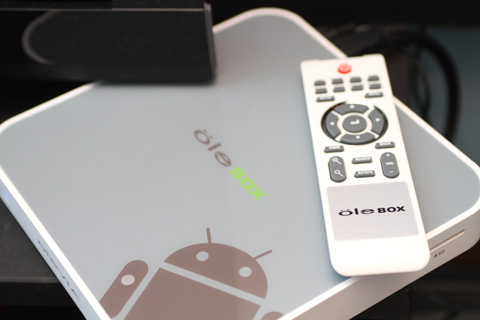
The box looks pretty simple, made of plastic, a bit big (gives an impression there’s a 2.5″ HDD inside) and weighs 427 grams. The white and pale grey colors add to the simple yet elegant design. I just wish they could have make the box a bit smaller though.
We’ve tried a lot of those HD media players in the past couple of years (I have 4 or 5 of them around) but this one adds more interaction by allowing users access to Google Play and download thousands of apps and games. That’s on top of being able to play full HD 1080p videos via the HDMI output.
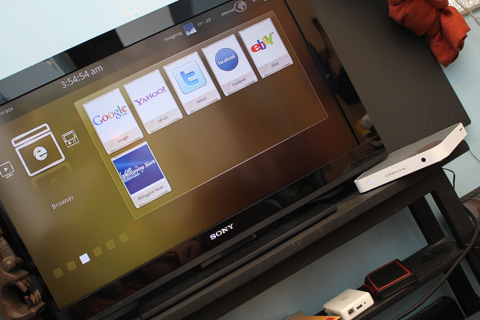
The Olevia Box runs on Google Android 2.3 Gingerbread but they managed to simplify the user-interface of the box. The interface does not look like Gingerbread at all and resembles a media-player style of presentation with the main section stack like a carousel.
Ole Box specs:
3Core 1.2GHz processor
Super 3D GPU
1080p multimedia chipset
512MB DDR3 RAM
1GB internal storage
8GB built-in NAND storage
GC800 Graphics Engine
WiFi 802.11 b/g/n
10/100Mbps LAN port
HDMI port
S-Video ports
SD card reader
2 x USB 2.0 ports
1 x optical audio
1 x CVBS port
1 x RJ45 port
Android 2.3.1 Gingerbread
Olevia UI
At the back of the box are options for connecting the device to an external display like an HDTV. The primary and most recommended would be the HDMI port.
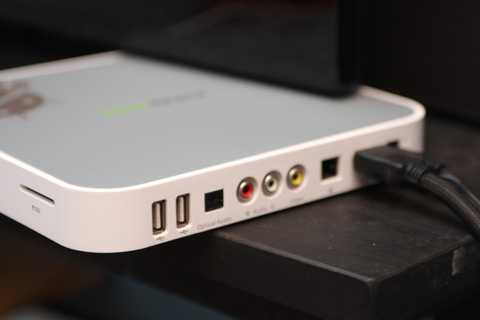
There’s also two USB 2.0 ports so you can connect the box to additional accessories. I was able to plug an external USB mouse to help me navigate the player and another portable HDD drive to access more the HD movies.
The box also comes with an IR remote control but it’s a bit hard to navigate with it alone. I’d say plugging a mouse and keyboard should help maximize usability of the box.
We ran a couple of benchmarks on the set and got 2372 on Antutu Benchmark while Quadrant Standard would not run the test.
Over-all, the system feels responsive but not that snappy. It’s comparable to a lot of those smartphones with a single-core 1GHz processor. For an HD media player, it’s actually a really good one already. We could not run a number of apps on the device though, including Temple Run.

Suggested retail price is in the Php12,500 range and is available in 5th Avenue Stores in the malls.










Apple, Asus, Cherry Mobile, Huawei, LG, Nokia, Oppo, Samsung, Sony, Vivo, Xiaomi, Lenovo, Infinix Mobile, Pocophone, Honor, iPhone, OnePlus, Tecno, Realme, HTC, Gionee, Kata, IQ00, Redmi, Razer, CloudFone, Motorola, Panasonic, TCL, Wiko
Best Android smartphones between PHP 20,000 - 25,000
Smartphones under PHP 10,000 in the Philippines
Smartphones under PHP 12K Philippines
Best smartphones for kids under PHP 7,000
Smartphones under PHP 15,000 in the Philippines
Best Android smartphones between PHP 15,000 - 20,000
Smartphones under PHP 20,000 in the Philippines
Most affordable 5G phones in the Philippines under PHP 20K
5G smartphones in the Philippines under PHP 16K


bern says:
🥉 Bronze🏆1
Expensive!
better off to choose this: (from LG) $50.
http://www.amazon.com/LG-ST600-Upgrader-Streaming-Internet/dp/B004OVEYTO/ref=sr_1_2?s=electronics&ie=UTF8&qid=1337346076&sr=1-2
Abe Olandres says:
🥉 Rookie🏆3
I think it’s cheaper coz it’s not an Android box.
Obob says:
🥉 Bronze🏆1
I don’t get it… Android is free and open source so why charge 12,500 Php. What bern posted is priced at 2200 Php
Mr A says:
🌱 Noobs🏆1
The price came from the hardware. That spec almost looked like from a mid-range smartphone, cheaper actually.
Sonofa says:
🥉 Rookie🏆1
How do you play temple run from here?
dasuidysa atajshdkja says:
🌱 Noobs🏆1
try tilting the HDTV
Fordie says:
🌱 Noobs🏆1
Sir Abe, may iba pa po ba alternative devices like the Olevia Box and the LG ST600?
obob says:
🥉 Bronze🏆1
noontec, popcorn hour, just search in google HD Media Players
emman says:
🥉 Rookie🏆1
San dito nakabi2li ng popcorn hour s manila? Anyone…Thanx
hendrickchan says:
🌱 Noobs🏆1
you guys might want to look at this. android boxes with HDMI output are getting smaller and smaller.
http://news.cnet.com/8301-17938_105-57439660-1/android-mini-computer-selling-for-just-$74/
http://www.fxitech.com/products/
Mr A says:
🌱 Noobs🏆1
It more smaller than the Phi, cheaper as well. Too bad the stock ran out, we have to wait June 10 for it to be available, but that batch must be from those who pre-ordered today. Anyway, it’s only $74 bucks, so why not spend that money on this.
lawrence says:
🥉 Rookie🏆1
medyo mahal nga for an android tv box.
here’s an alternative that was posted in this blog a few months back:
http://www.yugatech.com/tv/noontec-cube-a9-turns-your-tv-to-an-android-smart-tv/
Sir Yuga, how would you compare the Olevia Box with the Noontec A9, considering the A9 is priced at half as much as the Olevia?
log says:
🌱 Noobs🏆1
Sir yuga..im planning to buy a media player. Nka2download b to ng torrent? Mas okay b to s asus o’play hd2 at wd tv live hub 1 TB?
lawrence says:
🥉 Rookie🏆1
@log,
I haven’t tried this but a quick google would show that there are torrent apps for android. One such app is http://androidadvices.com/android-app-download-torrent-files-resume-support/
Dazed_32 says:
🌱 Noobs🏆1
Me likey… Dear Santa… :-)
jonaflormicfren says:
🌱 Noobs🏆1
Great! It functions like a cpu.
Hideki says:
🌱 Noobs🏆1
maganda yan, mahal nga lang talaga. dami pa jan alternatives na mas mura. :D para ata makalaro ng temple run, dapat touchscreen ung tv mo. ahahah di ko alam if nagana dyan yung mouse o yung portable touchpad
Bryan says:
🌱 Noobs🏆1
Mas better pa siguro kung ito na lang
http://www.engadget.com/2012/02/29/hands-on-with-fxi-cotton-candy-at-mwc-video/
at eto pa..
http://www.engadget.com/2012/05/18/mk802-beats-cotton-candy-to-market/
sana meron na dito nyan sa atin.. ang liit lang ng footprint ng device.. can be controlled via android phone as a remote. with built in WiFi, Bluetooth, USB at HDMI at naka android ICS pa.. a size of a flash drive.. Instant Smart TV! pwede lang conceal sa likod ng tv.. hehe
roiji says:
🥈 Silver🏆1
gusto ko sana kayo mahal… kung 2.5k~4.5k sana bibili ako T_T
misutatokumei says:
🌱 Noobs🏆1
Okay sana kung may ISDB-T tuner yang box na yan para pwede makasagap ng Digital TV broadcasts sa Pilipinas.
raj says:
🌱 Noobs🏆1
it says 3core, but actually its single core. dont trust.
Julius Lim Roxas says:
🌱 Noobs🏆1
What to fo if its malfunction,can’t open how can i fix it.