

HUAWEI MatePad 12 X (2026) Review



We recently discovered that the new Smart Bro LTE Pocket WiFi that is being offered to subscribers lately is the one from Alcatel. It looks like the Alcatel One Touch Link Y800 replaces the usual Huawei LTE pocket WiFi offered before.

We chanced upon the new pocket WiFi when it was awarded to one of our teams by Mazda Philippines for joining the fuel economy experiment in Clark over the week-end. It came packaged as a prepaid kit with an LTE SIM card and 7 days worth of mobile internet.
We’d assume that it is the one being offered by Smart in their online store for only Php4,888 per kit.
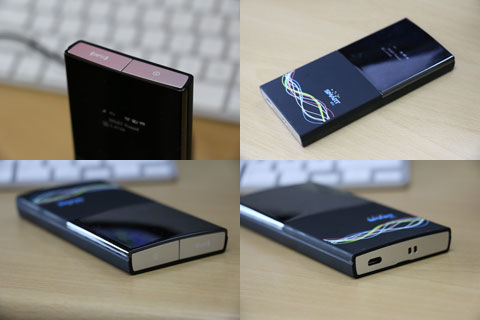
The kit includes the WiFi router, two 1,500mAh batteries and a charging cradle. The spare battery was a bit of a surprise but it’s great to know you can always readily replace the other one once it becomes worn out due to constant use. The charging cradle also makes it easier to set the pocket WiFi in place.
The extra battery and charging cradle makes the Php4,888 price tag seemed more palatable for an LTE device. Perhaps this is the reason why Smart switched to Alcatel from Huawei for their LTE pocket WiFi.

The Alcatel Y800 uses a regular LTE SIM, supports a quad-band LTE network and is capable of sharing internet connectivity with up to 10 devices.
Data Rate: LTE 100Mbps downlink, 50Mbps Uplink
4G LTE Bands: 800/900/1800/2600 MHz
3G Bands: 900/1800/2100 MHz
2G Bands: 850/900/1800/1900 MHz
WiFi 802.11b/g/n, 2.4GHz
Storage: 2GB NAND flash internal storage + 1GB LPDDR RAM
Li-Ion 1500mAh battery
You can get this from Smart for Php4,888 and comes free with a Smart Bro prepaid LTE SIM which is good for 7 days of LTE connection.










Apple, Asus, Cherry Mobile, Huawei, LG, Nokia, Oppo, Samsung, Sony, Vivo, Xiaomi, Lenovo, Infinix Mobile, Pocophone, Honor, iPhone, OnePlus, Tecno, Realme, HTC, Gionee, Kata, IQ00, Redmi, Razer, CloudFone, Motorola, Panasonic, TCL, Wiko
Best Android smartphones between PHP 20,000 - 25,000
Smartphones under PHP 10,000 in the Philippines
Smartphones under PHP 12K Philippines
Best smartphones for kids under PHP 7,000
Smartphones under PHP 15,000 in the Philippines
Best Android smartphones between PHP 15,000 - 20,000
Smartphones under PHP 20,000 in the Philippines
Most affordable 5G phones in the Philippines under PHP 20K
5G smartphones in the Philippines under PHP 16K


lee17 says:
🌱 Noobs🏆1
I bought two of these babies over the week, one for my apartment and one for my office. I was supposed to get a data plan but didnt want to get tied down by the contract. So I bought one, was so satisfied that I pitched it to my boss and now we have prepaid LTE for the office. By far ita the best purchase I have ever made. I’m never going back to 3G ever again.
meh says:
🥉 Bronze🏆1
1500mah is not very much when it comes to LTE my huawei E5776 has 3000mah . And when it comes to LTE and travel you need as much battery as possible. 3000mah makes it almost the entire day
meh says:
🥉 Bronze🏆1
I do like the dock though, thats a very nice feature. Too bad it can’t also double as an antenna somehow with the dock
Qwerty says:
🌱 Noobs🏆1
It comes with two 1,500 MAh batteries, though. But I agree, the E5776 is better.
Potpot says:
🌱 Noobs🏆1
No 3G band 5 850MHz? Smart’s LTE is running on band 1 2100MHz.
Nero says:
🌱 Noobs🏆1
Smart is using a customized firmware for their Y800 para gumana sa 2100MHz band 1 LTE. Wala pa din silang 1800MHz band 3 at 850MHz band 5 LTE.
rockz says:
🌱 Noobs🏆1
Smart is running 1800 and 2100 on LTE esp in Vis/Min areas. Mostly 1800 is for prepaid and 2100 for postpaid.
Qwerty says:
🌱 Noobs🏆1
How do you know they’re operating on 1800MHz? Their Twitter agents only say you need a 2100 MHz compatible device.
bogz says:
🌱 Noobs🏆1
Im from Mindanao(CdO)..4G LTE Prepaid here only support 2100Mz.
star says:
🌱 Noobs🏆1
can somebody try how long does it last with the 1500mah battery on continuous use LTE compared with the 3000 mah with the other brand. I want to know if it can last 8 hours for mobile use.
bond694 says:
🌱 Noobs🏆1
HUAWEI E5776 is much better. Supported LTE bands LTE800, LTE900, LTE1800, LTE2100, LTE 2600.
Arnold Cerdena says:
🌱 Noobs🏆1
Pano ba palitan yung AP nito ? kasi naka smartbro yung AP nya.
Brutus says:
🌱 Noobs🏆1
nag Insert ka ba ng regular SIM? baka nakalock ang APN nya para sa SMART BRO SIM lang
justcallmelloyd says:
🌱 Noobs🏆1
I just got 3 Huawei Smart LTE pocket WiFi :((
meanmoviemagic says:
🌱 Noobs🏆1
smart y800 wouldn’t allow you to select 802.11n. only shows 802.11b/g. is there a way to remove the smart firmware.
del TY says:
🌱 Noobs🏆1
it does not work at lte speed when connected 4g with lte sim, less than 1mbps. when set to 3G only speed up to 6mbps. on my huawei e589 I get 20mbps as high as 48mbps. who said it can work at smart band 2100 lte? no wonder prices went down to 3500 from third parties. consider this a warning to future customers. until smart activates its other non 2100 lte band.
IamMIKOY says:
🌱 Noobs🏆1
pag nakacharge sa cradle parang hindi siya maayos..medyo nakaangat ang isang side nya…
Jojo says:
🌱 Noobs🏆1
This SmartBro Alcatel Y800 is one of the worst gadgets I ever purchased!
Here are the problems:
1. Poor battery life
2. Screen is poorly-lit, hard to read when outside
3. Settings are “crippled” by Smart firmware, so you cannot change the APN
4. LTE reception is poor (even if nearest Smart LTE antenna is just right beside my house)
5. Network settings is severely limited (when you select 4G in dropdown list, it says “FAILED”
rupert says:
🌱 Noobs🏆1
Pano ka nakakapag select ng netwoerk? Yung sakin naka automatic lang, disabled ung button ndi ko mapalitan ung network.
Problema ko ngaun palaging naka 3G lang, ung ibang kasama ko na naka huawei may 4G naman silang nakukuha na signal.
Kororo says:
🌱 Noobs🏆1
@Rupert
Same thing sakin. Disabled yun settings ng network
tof-tof says:
🌱 Noobs🏆1
@rupert: tol, try mo eregister load mo para 4g signal makuha mo.
Pepay says:
🌱 Noobs🏆1
Ok na yung ALCATEL Y800kaso yung batt ang hina, kainis
Kororo says:
🌱 Noobs🏆1
My Alcatel keep’s turning off by itself, kahit nakacharge sa dock..
My Max DL speed hits only @ 4.5mb max, with 4g signal… using prepaid…
ged says:
🌱 Noobs🏆1
diba ang band ng SMART LTE ay 2100mhz?
bakit dun sa specification 800/900/1800/2600 MHz lang ang nakalagay?
Raewyn says:
🌱 Noobs🏆1
Pano po ba i-fix ung ganitong problem. Nakaregister naman ako ng 4G LTE 995 ung good for 1 month . Dto sa apartment ko lagi akong naka 4G pero ngaun bat naging 3g nalang. Tapos paminsan kusang namamatay kahit full batt naman. ang ginagawa ko nalang pinapalitan ko ng battery tapos ok na ulit..
martin says:
🌱 Noobs🏆1
Possible software issue with this device. Every week bumabalik ako sa Smart Store – Festival Alabang to have my device checked and replaced with a new unit. Problem kasi, pagkatapos mong gamitin after 5-7 days, hindi na nagbro-broadcast ng WiFi signal ung device pero may signal naman from Smart’s LTE network. Ang labas nun, hindi maka access ung laptop/phone ko ung pocketwifi at hindi sya maka connect sa internet. Balik na naman ako bukas sa kanila. Hopefully, bigyan na nila ako ng previous LTE wifi modem nila kesa sa Y800
Raewyn says:
🌱 Noobs🏆1
Wala na naman ulit signal ang 4G panay 3G lang. sayang ung load ko ng 995. Pag sinet ko ung network to 4G only walang signal. Dati naman akong 4g dito sa lugar namin sa Mandaluyong. Ano kayang solution dito mga paps?.
rory says:
🌱 Noobs🏆1
look if you guys want to fix this at least try to do a reset of the device
I had an alcatel glory locked on sun and did a factory reset. Little did I know both sims are unlocked. Therefore a single data wipe could remove smart’s previous firmware and return to the original
rory says:
🌱 Noobs🏆1
p.s trying it on a wifi device might and possiblt work since they opened it before we could open it
sean says:
🌱 Noobs🏆1
what router/device is compatible with SMART LTE network here in VISAYAS (Cebu City) that has LAN/ETHERNET???
Plan to make SMART LTE as DSL backup to our network. Thanks?
brian says:
🌱 Noobs🏆1
pede ba gamitan to ng WIFI ANTENNA?
Jesssica says:
🌱 Noobs🏆1
Hi, I’m new to this so please help. I have a smart bro lte pocket wifi, but the signal keeps fluctuating. I live in makati but our building is old with thick walls so that could be a reason. Will outdoor antenna’s work? If yes, which one?
Any other lte plans/devices without a download cap but with consistent wifi (at least 1mbps as the slowest but not going any lower than that)?
e.g. use ___ lte sim with ___ huawei device.
Ayaw ko kasi ng lock-in period.
Tsaka lagi lumalabas ung y800 when i’m surfing the net, replacing my searches or what im doing. What are the reasons for that? Is it just the device saying im switching from 4g to 3g vice versa? or me needing to click on the wps button for wake-up? Distracting kasi eh.
Please answer any of my questions.
Thank you!!
Sudoxe says:
🌱 Noobs🏆1
May datacap din po ba ito like yung sa Pocket Wifi po ng Globe? Kasi di ako sure dun sa advertisement nila na “Free 7 days UNLI ACCESS” which I think referring to LTE. Thanks to those people who’ll reply. And pag 3G po ba unlimited internet to? As long as nakasubscribe ka sa mga surf promos ng smart? First time ko po kasi gumamit ng Pocket Wifi.
Jessica says:
🌱 Noobs🏆1
Hi, I’m new to this so please help. I have a smart bro lte pocket wifi, but the signal keeps fluctuating. I live in makati but our building is old with thick walls so that could be a reason. Will outdoor antenna’s work? If yes, which one?
Any other lte plans/devices without a download cap but with consistent wifi (at least 1mbps as the slowest but not going any lower than that)?
e.g. use ___ lte sim with ___ huawei device.
Ayaw ko kasi ng lock-in period.
Tsaka lagi lumalabas ung y800 when i’m surfing the net, replacing my searches or what im doing. What are the reasons for that? Is it just the device saying im switching from 4g to 3g vice versa? or me needing to click on the wps button for wake-up? Distracting kasi eh.
Please answer any of my questions.
Thank you!!
Arnold C. says:
🌱 Noobs🏆1
Sablay pa din ang Smart sa area ko only Ortgas and Makati area lang talaga ang pure LTE. Anyways I find way to get rid of this lte signal issue. I have unlocked my device and now I can use Globe sim card on it now. If I’m mistaken we have a legit filipino unlocker here in metro manila that’s http://www.takeunlock.com and he made unit unlock in a few min.
dennis says:
🌱 Noobs🏆1
is free?
eddie says:
🌱 Noobs🏆1
Is ALCATEL ONE TOUCH WIFI cannot be locked? I bought one alcatel one touch wifi and I wish I can put password into it, more users can access my wifi and the battery would easily get drained. please assist me
Doods says:
🌱 Noobs🏆1
@Eddie: I bought one yesterday and so far the device lived up to my expectations. Here’s how to change the password:
1.) Open any browser
2.) Type 192.168.1.1 and hit enter
3.) Type smartbro for the login passowrd (it’s the default password and can be changed later)
4.) Once logged in, hover your mouse over quick setup.
5.) click “admin passowrd” to change the password for your dashboard and “wifi setting” to change your SSID and wifi passowrd
Save alll changes and you’re good to go :D
bel says:
🌱 Noobs🏆1
hello everyone, i bought one yesterday, but i cant able to change the battery pack, pano po ba buksan yung cover sa likod,, nde sya ma slide… thanks in advance…tsaka ang h
Nicko says:
🌱 Noobs🏆1
Hi! I just bought mine a few days back. After using it for several hours it just turned off. And I can’t get it back on using the power button. Nid a lil help here, ty.
martin says:
🌱 Noobs🏆1
Mine did the same. It was working fine and suddenly turned off and was unable to restart it. However i removed the battery left it out for a second or two and then reinserted it and then was working fine. However it is still doing it!?
nicko says:
🌱 Noobs🏆1
You are right @martin, removing the battery did the trick. I went to the repair center, they observed it for two hours but it didn’t turn off. So I said to myself maybe it’s just a random glitch or something but the next day, there it goes again. I put it in front of the electric fan and it worked fine after using it for several hours so maybe if it’s too hot, it will auto shut off.
austen says:
🌱 Noobs🏆1
Mine did too. My trick was leaving the back uncovered. I hope this will help.
martin says:
🌱 Noobs🏆1
Well mine kept on turning off so i send it back to supplier. Will see what he says!
Nicko says:
🌱 Noobs🏆1
@austen, thank you for the advice.
@martin, pls inform us what they say about it when they return it to you. Thanks!
Joe says:
🌱 Noobs🏆1
Great trick with leaving the back cover off to prevent it from overheating. I got mine in April 2014 here in Iloilo and it would do the same thing of turning off until you remove and slide back the battery.
One question, has anyone tried unlocking their Y800? I’ve seen sellers on Ebay who provide them once you give your IMEI device number. Just wondering since I might take mine with me abroad and would like to avoid buying another 4G LTE device since this one works well and supports alot of LTE,3G,2G bands.
Susan Valmayor says:
🌱 Noobs🏆1
Hi!
I’m have Alcatel ONE TOUCH link Y800 4g / 100 mbps ( connects 10 wifi device which i bought it in hongkong…my concern is, does it really need to use Smart LTE sim card to make it faster or stronger internet connection ? i’m using only just normal sim card. my other concern is that, i tried using my password to control the users , but it will not work.However, it is also possible that my password is wrong and could not trace it anymore… is there any thing I can do to put a password on it , what are the procedures…can you refer me to somebody who knows how to operate this unit….Looking forward to hearing from you soonest possible time and i would really appreciate if you can assist me with my concerns /problem. I travel most often and I really need this unit to work properly for business reason… I’m base in Cebu City, Phil..Many thanks
Doods says:
🌱 Noobs🏆1
If you forgot your password, you could always reset the device by pressing the reset button found at the back of the device. Just remove the back cover and at the upper right corner of the device, you will find a tiny reset button. This will reset the device back to its default configuration. By the way, the default password for the device is “smartbro” (without the quotes). Afterward, you could then change your password, SSID, and etc.
jan says:
🌱 Noobs🏆1
mga sir, panu ba i force na 4g hanapin nya, 3g auto kasi nasa network, gusto ko 4g lang kahit 1 or 2 bars sana. salamat sa tulong
Nick says:
🌱 Noobs🏆1
Punta ka sa homepage (192.168.1.1). Login ka then sa connection > connection status > “disconnect”. Kapag disconnected na, Select mo ulit Connection > Network > Network Mode > 4G only or 4G prefer.
Noel says:
🌱 Noobs🏆1
Only 802.11 B/G and not N. Cannot bypass the 7 days free connection that comes with the new Smart LTE SIM, it’s only using 3G. You cannot load LTE 299 or LTE 995 until after the 7 day free subscription is up.
dennis says:
🌱 Noobs🏆1
how to unlock alcatel y800
super slow here in tacloban.city smartLTE
phil says:
🌱 Noobs🏆1
help po. may napalitan ata akong setting sa device. di n ngaun ma access ang home page ng smart. pfactory reset ko sana sya pero kahit gamitin ko ng 192.168.1.1,hindi nag rerespond ung reset button.. help please!
cain says:
🌱 Noobs🏆1
punta ka sa site ng alcatel one touch, google mo “alcatel one touch y800 firmware update” tapos follow mo nlng screen instructions. maaayos yan, bibilis pa.
gonix says:
🌱 Noobs🏆1
So pag free na 1 week internet, 3g lang talaga? good to know. muntik na kong pmunta sa wireless for this eh.
Grim says:
🌱 Noobs🏆1
Not really. Yung 1 week na free internet nila is actually 300 pesos worth of airtime balance. Unless ipapa register mo sa LTE promo nila 3G lng tlaga makukuha mo. Nung nabili ko yung unit ko eh meron padala na 300 pesos load sa sim tapos ayun, nagpa unli ako ng LTE 299. LTE all the way :D
gonix says:
🌱 Noobs🏆1
sayang sana pala ganyan na lang ginawa ko..
Cat says:
🌱 Noobs🏆1
Hello po, I updated the firmware of my ALCATEL Onetouch. Suddenly the usual 3G went to 3.5G which is shown in the icon as H then H+. The signal is good at least 4 to 5 bars. It’s unsually slow and I don’t what to do to make it fast again.
Cat says:
🌱 Noobs🏆1
know*
Nick says:
🌱 Noobs🏆1
katatapos lang mag-install ng 2nd update para One Touch Y800.
Details:
1st Update:
SW Ver:RX413A2XX
2nd Update:
SW Ver: RX1415A2XX
Napansin ko lang sa signal, yung dating “4G” naging “4G-LTE”.
Then yung mga profiles na lumabas sa Update 1 gaya ng:
SmartBro, Smart Internet, Smart LTE, Smart GPRS; nawala lahat sa Update 2. Ang naiwan nalang sakin SMART LTE.
Kung sa speed at lakas ng signal di ko masasabi kung anong pinagkaiba. Dati na kasing malakas 4G connectivity ko (Pasig Area). Naka Postpaid Plan ako sa smart yung may kasamang phone. So basically, nilipat ko lang yung postpaid sim ko papunta kay Y800.
Nick says:
🌱 Noobs🏆1
Ito nga pala yung link: http://www1.smart.com.ph/Bro/support/downloads
Yung “Download” button, nakalink sya sa Main Site ng Alcatel.
Basahin nalang po at sundin yung instructions.
Pag nakapag upgrade na rin kayo, share po para macompare natin yung mga changes.
Paige says:
🌱 Noobs🏆1
I cannot update my software :(
Help.. Here’s wat i did, pls check if i lacked to do something
1.found the “check for update”button, clicked
2. Installed MSOU file
3. Connected my device to pc (its charging) vista
4. Run MSOU
But wat it ends up with “no device available”
Wat does that mean? It wont read my device?
Do i need drivers for it to be read?
I tried several times, i cant get it to connect:(
aishtupido says:
🌱 Noobs🏆1
nick,naupgrade ko firmware ko,ang problema nasira ata,pag inuon ko ei stock lang siya sa loading screen na smart,and disabled nga power button and reset buttto,pano ka nag downgrade?
thanks
Teree says:
🌱 Noobs🏆1
Hi Guys,
Meron po akong na eencounter na issue sa Y800 device ko. There are times na nareredirect ako sa Y800 homepage while trying to browse. Tapos may nagpropromt din na “sign in to network”. Prepaid yung LTE sim ko at naka register ako sa unli LTE na good for 7 days. Okay naman sana yung signal ko na 4G -pero nag reredirect pa rin siya.
If you happen to know the cause and fix for this, let me know po.
Thank you! :)
jay says:
🌱 Noobs🏆1
Nag uppdate ka na ng software?
Nararanasan ko rin ang ganyan dati.
Pero after ko i-install ang software version RX1415A2XX, nawala na yung redirection sa Y800 homepage.
Teree says:
🌱 Noobs🏆1
Na download ko na po yung patch kaso palaging undetected yung device ko. Naka connect po yung Y800 device ko sa laptop pero hindi talaga mdetect so hindi ko ma install yung upgrade. May na skip po ba ako na step? :(
Icebox says:
🌱 Noobs🏆1
Hi, I am currently encountering you problem right now. i triedto watch the screen of the device while browsing from my tablet. nag riridirect siya pag aabot na ng 18Mb ung data used mo. and its always like that for a couple of days na. thats why i was checking forums and updates baka may bandwidth cap na ang smart prepaid lte until i saw this post. my sim is currently registered as 995 upto sept 1 pero di ko na na eenjoy ang internet because of this issue. i tried to load kagabi ng 50 for a 1 day lte para ma supersede ang 995 pero ganun pa rin. btw, with regards to updates? pano ba ma update ang device baka eto lng ang kelangan.
Icebox says:
🌱 Noobs🏆1
i just updated my device’s software. It says “Download OK!”, device was restarted, and tried again. Still, when it reaches 1Mb data usage, it changes its connection to a lower speed. from 4G to H+. Any other idea? Or maybe this prepaid LTE already have data/bandwidth cap?
Icebox says:
🌱 Noobs🏆1
i just updated my device’s software. It says “Download OK!”, device was restarted, and tried again. Still, when it reaches 18Mb data usage, it changes its connection to a lower speed. from 4G to H+. Any other idea? Or maybe this prepaid LTE already have data/bandwidth cap?
just an observation sa updated device, hindi na nag riridirect ang page pero the connection changes.
ramon says:
🌱 Noobs🏆1
naupdate ko lng ung software. nd na cya nagaredirect.
eman says:
🌱 Noobs🏆1
guyz, meron kayong link nung udpate? the site sa alcatel keeps on looping so I cant download the update. . my connection keeps disconnecting and i have to reset the device tapos always showing as connecting to the y800.home/index..
Nick says:
🌱 Noobs🏆1
Try this link
https://mega.co.nz/#!QtNmULxC!R3_8U0-dMbw1zMHl1IdiUUcoNy9y8wl4oDhh1dKHD-I
Nick says:
🌱 Noobs🏆1
Habang nasa RX1415A2XX sinubukan ko ulit ang function ” check for update” sa pc. May bagong version na nadetect “RX14ZZ…” Wag nyo install, kasi sinubukan ko sya at ang result:
1. Pwede maturn ON ang device at nakakasagap sya ng 4G signal pero wala ng wifi signal.
2. Hindi na rin ma-off ang device gamit ang off button.
3. Ayaw na rin gumagana ng reset button.
Kaya kung mag-update kayo, make sure na RX1415A2XX yung software version.
aishtupido says:
🌱 Noobs🏆1
nick,naupgrade ko firmware ko,ang problema nasira ata,pag inuon ko ei stock lang siya sa loading screen na smart,and disabled nga power button and reset buttto,pano ka nag downgrade?
thanks
Nicl says:
🌱 Noobs🏆1
Nababasa pa ba ng pc mo si Y800 pag kinonekta mo sya gamit ang usb cable?
Pag nababasa pa.. pwede ka pang magdowngrade.
Heto download mo toh.. RX1413A2XX version
https://mega.co.nz/#!N1lVkThJ!2TFBRecIcH1FmkDV59xgVFe-Cc6sv_3YpBgcsyrf6zw
Nick says:
🌱 Noobs🏆1
Or
1.try mo tanggalin ang battery.. insert mo ulit at saka mo i-power on si Y800.
2. Pwede mo rin subukan ang reset button sa likod ng device.
Pag parehong di gumana.. saka ka magdowngrade
aishtupido says:
🌱 Noobs🏆1
parehong di gumana pre,ill try to downgrade,thanks in advance
aishtupido says:
🌱 Noobs🏆1
nadownload ko na firmware,kaso ayaw madowngrade,.
nadidetect pa naman device ko kaso pag dinadowngrade ko na ei “download failed”
help please,thanks
Nick says:
🌱 Noobs🏆1
Try mo ulitin baka nagkaproblema lang.
Subukan mo rin yung RX1415A2XX na version.
May file ka na nun di ba.
Kung wala pa, nasa taas yung link. Yung unang pinost ko.
Sasch says:
🌱 Noobs🏆1
I am facing exactly the same problem as Icebox. When i started the device and checked its speed it went up to 28k Mbit/s then sudden drop to death.. Internet getting extremely slow and thats it..
Now today it got even more worst, because i can’t obtain anymore an IP to connect to internet OR Device. Whenever i try to load 192.168.1.1 it ends up dead, but the device seems to do fine. I took already the battery out for 15+ minutes and resetted it, but nothing changed.. Still no IP, no connection, nothing.
Does someone knows how to fix it?
Kindly
Icebox says:
🌱 Noobs🏆1
Hi Sasch, you might want to reset your device by manually pressing the small button at the back.
I still trials to make to prove this issue. Ill just post later todayif i have progress. Im starting to get annoyed on this concern and my wife is started to get annoyed on me. just w** is going on?
Sascha says:
🌱 Noobs🏆1
The reboot i had dome already and seemed to be processed. Had renamed the SSID to Sascha LTE and it was now back to Smart .. but i just did it again and will try to connect to it again.. hope that the problem of getting a dead line after some MB is gone than also :(
Sascha says:
🌱 Noobs🏆1
Just rebooted, but still same problem. Computer shows connection to the device, but trying to access it with 192.168.1.1/www.smartbrosettings.net fails. Also it does show no connection to the internet.
Tried to use mobile phone and it gets stuck at:
Status: Obtaining IP address…
Yesterday that was at least all function.. today the device sucks more than ever!
Icebox says:
🌱 Noobs🏆1
Confirmed, no data cap, i tried other sim and still, the problem exists. now, there are only two problem i am seeing. Number 1, defective device , and number 2, smart communication problem.
Sascha says:
🌱 Noobs🏆1
Day 1: Whole day LTE Connection
Day 2: LTE Connection in the first 20 Seconds
Day 3: LTE Connection in the first 20 Seconds
Day 4: LTE Connection in the first 20 Seconds
Day 5: Y800 Device no more possible to connect. Checked with Laptop, 2 different PC’s and Cellphone, no IP obtained.
If the device is damaged, than i believe due to overheating as it was mentioned in one of the previous Comments.. Damn i hate so much to go City for a replacement.
Found also already someone stating that you shouldn’t go with any branded LTE Devices and more getting your own one and add a LTE Sim to it. Doesn’t cost much more (4888 Peso for the SmartBRO one) and because you choose yourself you can get more reliable ones.
Good to know all that AFTER purchasing the SmartBro branded one -.-
Grim says:
🌱 Noobs🏆1
I’ve been having problems since last night when I’m being redirected to the router homepage http://y800.home/index.html every couple of minutes. Tried to reboot the device several times but to no avail. I’ve tried putting the sim (registered to LTE 299) on an LTE capable phone but no LTE signal. I think there’s a problem with the network. I’ts the first time this has ever happened since I purchased the device. The problem still persists up till now. Any suggestions?
cain919 says:
🌱 Noobs🏆1
have you all tried the latest firmware update, baka gumana. sakin kasi yun din ang problem, hindi pa alam ng service center kung paano ayusin. good thing nakita ko ang update software sa alcatel home tsaka sa smart website. so far ok na si bro
Icebox says:
🌱 Noobs🏆1
Yes, already did some update. the only difference is the indicators. from 3G to H/H+. But with regards to the connection, nothing happens.
Grim says:
🌱 Noobs🏆1
Same thing here. Tried upgrading and downgrading but nothing happens. I’m also experiencing the same thing about being redirected every time data usage reaches 18 Mb. I’m not sure if this is an issue with the device. I just experienced this kind of problem yesterday and the rest before that was pretty good.
Sascha says:
🌱 Noobs🏆1
Sooo, after a while I am back here. Nothing changed on the devices. But a complaint to Smart (with mySmart no answer.. as GUEST i got my support .. whatever!) … Three days later Line was FINE .. both devices are running again without problems. Could have been the weather or a defective (now repaird) part on Smart end, but whatever it was. Not it is all back to normal.
lil zebra says:
🌱 Noobs🏆1
Hi I have just purchased a contract alcatel y800 and I’m inserting the sim and all it keeps saying is no sim, I know I’ve put it in right but is it becoz the server may take up to 24 hours for the sim to activate?