


With the extended community quarantine, the majority of people are stuck in their respective homes. Luckily in the Philippines, a lot of utility companies are compensating their customers by extending their payment deadlines in light of COVID-19.
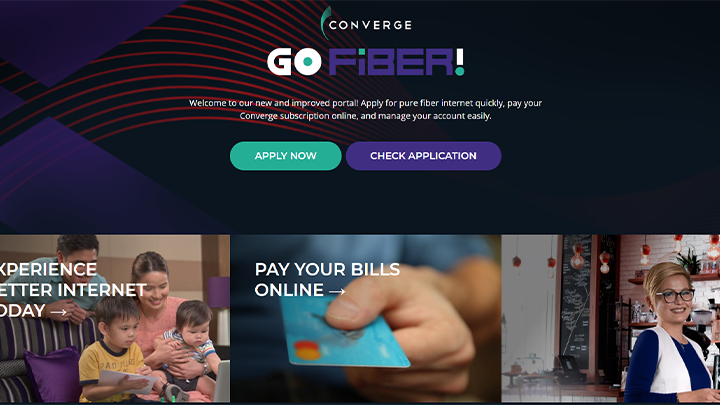
With that being said, Converge also offers an online solution to settling your bills. If you’re a current subscriber, you will be receiving your Statement of Account via SMS and email. And if you want to pay online, follow this guide and we’ll show you how.
First, if you have not received your SOA from Converge yet, check out this link 1.2K to be able to view your unpaid charges for the month. All you have to do is enter your account number, basic information, and agree to the terms and conditions.
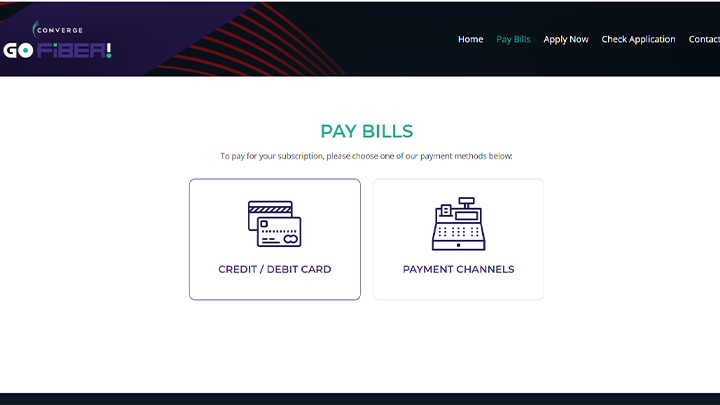
Now that you have viewed your electronic bill, you may now proceed to pay. Visit gofiber.ph/paybills 720, and you will immediately see an option to choose whether to pay via their Payment Channels (i.e., 7/11, Bayad Center) or your debit/credit. Again, we’re going to be picking the latter.

Once you have been redirected to the next page, enter your account number, the amount you are planning to pay, and tick the Captcha box to continue.

Enter the remaining details such as the cardholder’s first name, last name, billing address, email address, and mobile number. After filling this all up, click on “Pay Now” at the bottom of the page.

You will then be redirected to the payment site, where you can see an overview of your order summary and billing details. Once you input your card details, all that’s left to do is to tick on the terms and conditions and hit “Pay Now” below, and you’re all set!
If you prefer to use your GCash, Smart Money, Paymaya, or any other similar e-wallet service to pay for your Converge bill, that’s possible as well!

Although these apps are not related to one another, they do share a similar user interface that’s simple to use from the get-go. To be able to do this, just look for the “Pay Bills” option on the main menu. Afterward, search for Converge, and input your account number and user information.

You may also opt to settle your bill through your bank’s dedicated mobile banking app (i.e., BPI Express Online). Unlike e-wallets, each app is quite different, so make sure you check with your bank’s services to find out how you can enroll your bills and pay them straight from their app.
And that’s all there is to it! If you wish to pay for other bills such as your Meralco bill, check out this link 17. And for a list of other bills that you can pay for online, we got you covered as well. Just head over to this link 11 over here. We hope we were able to help!






Same dn sa akin nagbayad ako throw gcash pro wlA akong na received na chat mn lng or tx na ur already paid! blah blah blah! Pls pku ayos ng service nyo ASAP ?