
Beta testers who are members of Apple's beta testing program have already received the iOS 11.2.5 beta update over-the-air after installing the proper certificate on an iOS device. That said, this article will guide you on how to install the latest public and developer beta on your iPhone.
Apple는 iOS에 대한 베타 업데이트를 폐쇄형 개발자 베타 또는 iPhone에 대한 공개 베타 형태로 제공합니다. 베타에는 새로운 기능이 포함되어 있지만, 사전 릴리스 버그가 포함되어 있어 iPhone를 정상적으로 사용할 수 없게 만들 수 있으며 기본 기기에서 일상적으로 사용하기 위한 것이 아닙니다. 따라서 소프트웨어 개발을 위해 필요하지 않는 한 개발자 베타는 사용을 피하고, 공개 베타는 주의해서 사용하는 것을 강력히 권장합니다. 이러한 베타는 공개 프로필 또는 개발자 프로필 형태일 수 있습니다. 베타 빌드는 일반적으로 먼저 개발자에게 배포되고, 곧이어 공개 베타 버전이 따라옵니다. 베타 업데이트를 받으려면 다음 단계를 따르세요.

어떤 아이폰에서 새로운 베타를 실행할 수 있나요?
- iPhone X
- iPhone 8
- iPhone 8 Plus
- iPhone 7
- iPhone 7 Plus
- iPhone 6s
- iPhone 6s Plus
- iPhone 6
- iPhone 6 Plus
- iPhone SE
- iPhone 5s
Public Beta
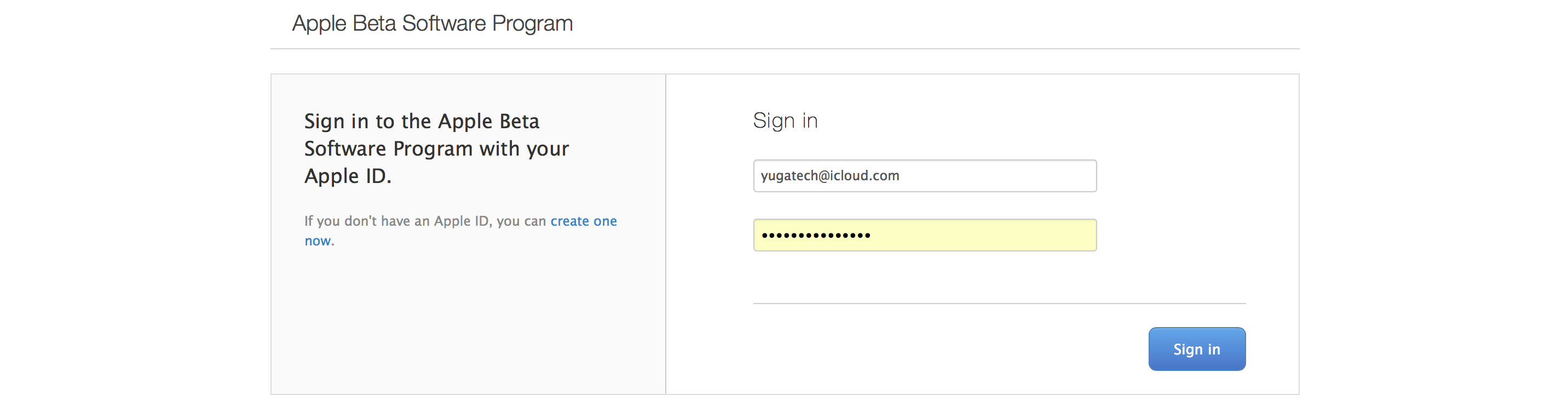
- First off, head over beta.apple.com on the iPhone you want to enroll in the beta.
- Click on Sign up to get started. If you've already signed up for a previous public beta, tap on Sign in.
- Enter you Apple ID email address and password.
- Tap Sign in and Accept to agree to the terms and conditions.

- Go to beta.apple.com on the iPhone you want to enroll in the beta, if you're not there already.
- Tap the iOS tab, if it's not highlighted already.
- Tap on Download profile.
- Tap on Install in the upper right corner.
- Enter your Passcode.
- Click on Install to consent to the beta agreement and Install at the bottom to confirm.
- Restart to reboot your device.

- Launch Settings, tap on General, then tap on Software Update.
- Click on Download and Install.
- Enter your Passcode.
- Tap Agree to the Terms and Conditions and tap Agree again to confirm.
Developer Beta
If you're interested in becoming an Apple developer, you can visit developer.apple.com and read about Apple's Developer program. Developers tend to get beta software first, but that software can be unstable and bug-prone. To get access to developer betas, you'll need to enroll in the company's $99/year developer membership.
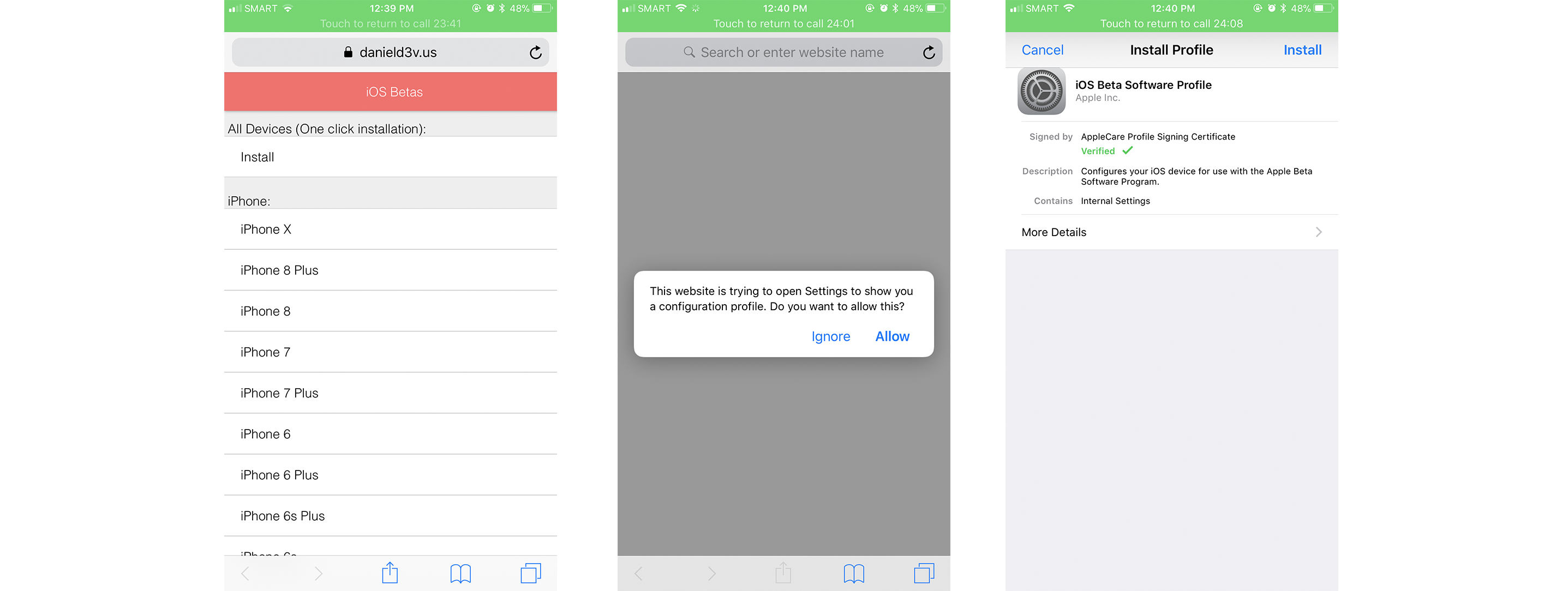
- 원하는 iPhone에 무료 iOS 개발자 계정을 얻으려면 danield3v.us/betas/gm.php 로 이동하십시오.
- 빠른 원클릭 설치를 위해 Install을 선택하십시오. 이렇게 하면 구성 프로파일이 자동으로 다운로드됩니다.
- 오른쪽 상단에서 iOS 개발자 베타 소프트웨어 프로파일을 Install 하십시오.
- Passcode를 입력하십시오.
- 베타 계약에 동의하려면 Install 을 클릭하고, 확인하려면 아래의 Install을 클릭하십시오.
- Restart을 선택하여 장치를 재부팅하십시오.

- Launch Settings, tap on General, then tap on Software Update.
- Click on Download and Install.
- Enter your Passcode.
- Tap Agree to the Terms and Conditions and tap Agree again to confirm.
If you previously tried out a beta version of iOS ahead of its full release and want to revert back into the stable iOS version, you should note that in order to get upcoming iOS releases you will need to remove the Apple configuration profile from your device. You can do this by going to Settings > General > Profile and selecting iOS Beta Software Profile, then choosing Delete Profile and entering your passcode to confirm the change.
That's our quick tutorial on how to receive beta updates on your iPhone. Do let us know if these helped you by chiming in the comments section below.

0 Comments
Leave a Reply