

Huawei’s newest iteration of their pocket WiFi is slightly different from the previous ones. The E5151 comes with a built-in LAN port just in case you want to hook it up to a wired line.
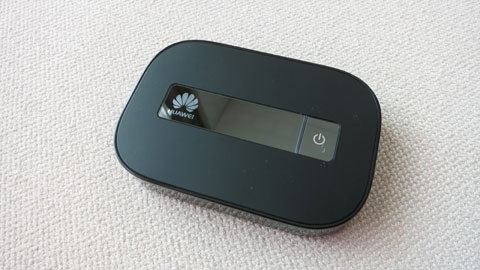
In my previous foreign trips, I would always bring with me a Huawei pocket WiFi and a portable WiFi router (like this one). The pocket WiFi is for a local 3G SIM that I normally use to avoid data roaming charges while the portable WiFi router is the one I use to convert hotel wired internet to wireless.

The Huawei E5151 solves that problem by incorporating a full-sized LAN port into the pocket WiFi. So, when I’m outdoors, I’d use the pocket WiFi function but when I’m in the hotel room, I’d hook it up to the hotel’s wired internet connection.
It’s especially useful since my Asus Zenbook Prime and Macbook Air don’t have built-in LAN ports. It also makes it more convenient when you want to connect all your portable devices like smartphones and tablets all at the same time (some hotel’s WiFi network only allows 1 to 3 devices at the same time for each login credentials).

The E5151 has a removable Li-Ion battery that lasts about 5 hours on a full single charge (uses a micro-USB port for charging via laptop or wall socket). It supports HSPA+ networks and can theoretically reach up to 21.6Mbps downlink speeds.
The device is a bit chunkier than the usual pocket WiFis from Huawei, probably because of the LAN port (92.8×63.5×16.3mm dimension).

It doesn’t have an LED display though unlike the E586 but still has a simple LED service indicators instead. However, you can download the iOS or Android app to allow you to manage the settings and monitor resources like signal, battery life and number of connected devices (in this case, the E5151 supports up to 10).
We still don’t have an idea about pricing and local availability but we’ll update this post once we get info from Huawei Philippines (some online stores peg it at $186). We also have a spare unit here that we’ll be giving away to readers too.















it’s a good 3g pocket WiFi, i had bought it from http://www.4glterouteur.eu/huawei-e5151-routeur-3g-21mpbs-mobile-wifi.html
But i’m waiting for the 4G Pocket WiFi with LAN Port
Does this work with LTE?
will it connect automatically to the internet once I hook it up to my PC?
Would it be alright to ask how you configured it to be a wifi router in the hotel LAN set.up? I’d really wanna know how to do it and i’m honest enough to admit i’m a bit of a Noob