

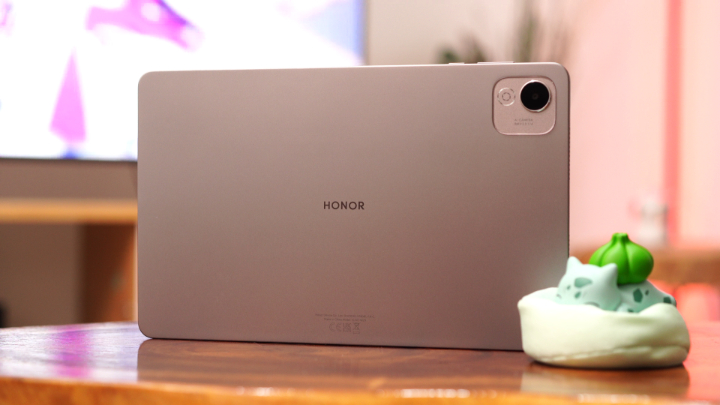
HONOR is back with another budget-friendly tablet, and this time it comes with a few unexpected features that set it apart from the rest. The HONOR Pad X9a offers a 120Hz 2.5K display, a sleek design, quad speakers, and a hefty 8300mAh battery—all for under PHP 11,000.
On paper, it sounds like a compelling deal. But is this really the ultimate budget tablet, or just another device with flashy numbers and little follow-through? Let’s dive in and find out.
Design and Construction
The HONOR Pad X9a may not carry a premium price tag, but it certainly doesn’t feel cheap in the hand. At just under 7mm thick and weighing less than 480 grams, the tablet strikes a nice balance between portability and usability. It’s light enough for one-handed use in portrait mode and comfortable to hold in landscape for watching videos or reading digital textbooks.

The frame is flat with rounded corners, giving it a clean and modern look. It’s mostly made of plastic, but the finish mimics aluminum quite well. The matte texture adds grip and minimizes fingerprints, while the build feels rigid and sturdy enough to handle daily use without issue. There’s no creaking or flexing when pressure is applied, which gives the impression of decent durability for a budget tablet.
You’ll find the volume and power buttons conveniently located on the top edge (when held in landscape), along with a single microphone. The power button itself has a satisfying click, but there’s no integrated fingerprint reader here. On the sides are four speaker cutouts—two on each end—and a USB-C port for charging and data transfer.



There’s no 3.5mm headphone jack, no microSD slot, and no stylus support either. Still, for the price, the essentials are covered. A minor but useful feature is that the buttons are easy to find by touch, which is nice when using the tablet in the dark or in bed.
The HONOR Pad X9a’s design doesn’t scream luxury, but it doesn’t look out of place next to more expensive devices either. It’s practical, well-built, and suited for both younger users and adults who want a dependable everyday tablet.
Display and Multimedia
One of the standout features of this tablet is the display. The Pad X9a boasts an 11.5-inch IPS LCD with a sharp 2.5K resolution (2000 x 1200) and a 120Hz refresh rate. For a budget tablet, that’s a big deal. Most competitors in this range settle for 60Hz displays with lower resolution, so this is a major point in the Pad X9a’s favor.

The high refresh rate genuinely improves the overall user experience. Whether you’re scrolling through long webpages, flipping through eBooks, or navigating the interface, everything feels smoother and more responsive. It’s not just a marketing gimmick—it makes the tablet feel snappier than its chipset might suggest.
Color reproduction is decent, though it’s not quite at OLED levels. Whites are clean, and the overall tone is neutral without a strong shift toward blue or yellow. For watching YouTube or Netflix, the screen is more than sufficient. However, brightness tops out at around 400 nits, which is fine indoors but not ideal for use under direct sunlight. Outdoor visibility suffers quite a bit.

Viewing angles are good, and the larger display size makes this tablet particularly well-suited for split-screen multitasking or reading full-page PDFs without constant zooming. The bezels are a little thicker than average, but they help prevent accidental touches and give your hands somewhere to rest.
As for sound, the quad-speaker setup is surprisingly capable. The speakers are tuned to prioritize clarity, and vocals come through well in both videos and music. Volume is strong enough to fill a small room without distorting at higher levels. While bass is definitely limited, mids and highs are handled nicely, making it enjoyable for podcasts, audiobooks, and even video calls.

What it lacks is that immersive punch you might get from a tablet with Dolby Atmos or more refined tuning. The soundstage feels narrow during movies or music with complex instrumentation, and low-end rumble is practically non-existent. Still, for the price, the audio experience is one of the better ones out there in this category.
All in all, the HONOR Pad X9a offers a strong multimedia experience that easily exceeds what you’d expect at this price point.
Camera
Cameras on tablets are often overlooked, and that’s still mostly true here. The Pad X9a is equipped with an 8MP rear camera and a 5MP front-facing camera. Neither is anything to write home about, but they’re fine for casual use.
The rear camera can handle basic needs like scanning documents, snapping quick photos of notes or whiteboards, or capturing reference images during class or meetings. It focuses reasonably quickly in good lighting, but detail is soft, and color accuracy is inconsistent. Overexposure is a common issue, especially outdoors.

Low-light performance drops off quickly, with visible grain and slower shutter speeds leading to blurry shots unless you hold the tablet very steady. There’s no flash to help in these situations, and the sensor is not equipped to handle challenging lighting.
The 5MP selfie camera fares a bit better for video calls. It handles face detection and exposure reasonably well, and you can use it for Zoom or Google Meet without issue. But again, results are average at best. Indoor lighting can make skin tones look a bit washed out, and the lack of detail becomes more noticeable on larger displays.
Both cameras are limited to 1080p video recording with average stabilization and no real standout features like AI beauty modes or portrait effects. That said, they serve their purpose and don’t detract too much from the overall value of the device.

If you’re looking for something to use for occasional video calls or quick photos, the Pad X9a does enough. But if camera quality is a priority, you might want to look elsewhere or stick to using your phone.
HONOR Pad X9a sample photos
Monday, May 19, 2025


Front camera:
Rear camera:
Performance
The HONOR Pad X9a is powered by the Snapdragon 685, a 6nm processor paired with 6GB of RAM and 128GB of internal storage. On paper, it’s not a powerhouse, but for the target audience and intended use, it gets the job done.
Day-to-day tasks like web browsing, streaming, note-taking, and light productivity are handled smoothly. The interface feels responsive, thanks in part to the 120Hz screen, which masks some of the chipset’s limitations. Opening and switching between apps is generally quick, and multitasking works reasonably well when you aren’t pushing the device too hard.

However, the limitations do show up when running heavier apps or games. Light titles like Pokémon Unite or Call of Duty Mobile run decently with medium settings so casual gaming should not be a problem at all. But once you move into demanding territory like Zenless Zone Zero or Wuthering Waves, the chipset begins to struggle.

Even at the lowest graphics settings, frame rates drop significantly, and textures may load slowly. Extended gaming sessions can cause some thermal throttling, leading to further performance degradation. Load times are longer than on more powerful devices, and you’ll start to see more stutters when multitasking or juggling background apps.
Storage performance is modest, and while 128GB is a decent amount for most users, there’s no option to expand via microSD. That’s a limitation for those who want to carry lots of media or large apps. HONOR does offer virtual RAM expansion, but the benefits are minimal in real-world usage.

In summary, the Pad X9a delivers reliable performance for everyday use but isn’t built for gaming or heavy multitasking. For students, casual users, or those focused on media consumption and light productivity, it’s perfectly acceptable. But power users will likely find its limits fairly quickly.
- Antutu v10.4.9 – 371,870
- Antutu Storage Test v10.3.9 – 72,830
- S.Read – 10,641
- Speed: 1070.0MB/s
- S.Write – 9,586
- Speed: 835.3MB/s
- R.Access – 40,124
- R.Speed: 592.0MB/s
- W.Speed: 336.0MB/s
- 3D Mark: Wild Life – 648
- Average frame rate – 3.89 FPS
- Geekbench 6 CPU
- Single: 478
- Multi: 1,492
- GPU OpenCL: 386
- GPU Vulcan: N/A
- PCMark Work 3.0 Performance – 9,327
OS, UI, and Apps
The tablet ships with MagicOS 9.0 on top of Android 15, which is a welcome surprise. Getting the latest Android version out of the box is rare in this price segment, and it gives the Pad X9a a small advantage over similarly priced competition.
MagicOS has improved over the years. It’s cleaner, snappier, and less cluttered than older versions. The UI leans into a minimal aesthetic, with neat transitions and simple icons. The notification panel and settings menu are easy to navigate, and there’s native support for split-screen, floating windows, and app cloning.
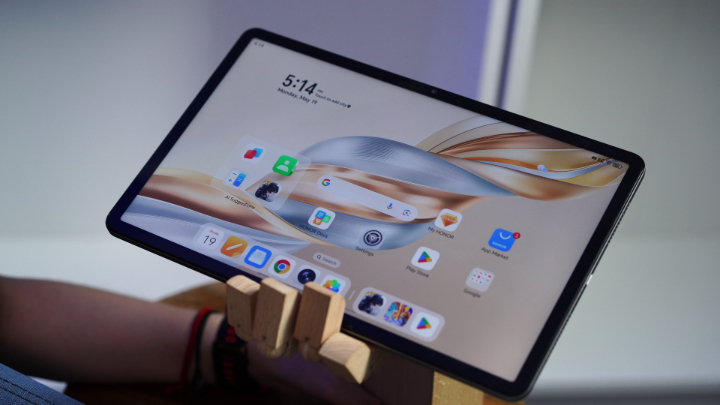
There’s very little bloatware pre-installed, and most of the included apps are either HONOR utilities or standard Android tools. You can disable or uninstall most of what you don’t need.
The tablet also supports basic productivity features. You can pair a Bluetooth keyboard and mouse to get a makeshift workstation setup. However, the software doesn’t switch to a desktop-like interface when doing so. There’s no equivalent of Samsung DeX or Lenovo’s PC Mode, which limits its potential for full productivity tasks.
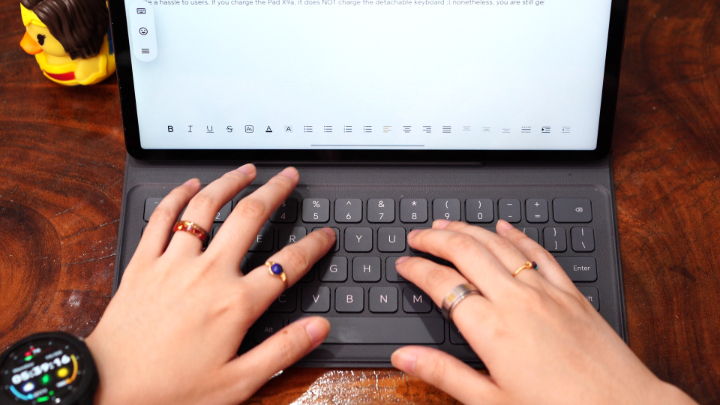
One annoyance is that screenshots taken using gestures (like three-finger swipes) are saved to a separate folder labeled “Favorites Space” rather than the standard Screenshots album. It’s not a deal-breaker, but it requires extra steps when managing your images or accessing them quickly.
Still, the overall user experience is fluid and pleasant. The software is stable, and app compatibility is strong, thanks to Google Play support and the latest Android base.
Connectivity and Battery Life
The HONOR Pad X9a is available in both Wi-Fi-only and LTE variants. There’s no 5G support, which isn’t surprising at this price point. What you do get is dual-band Wi-Fi, Bluetooth 5.1, and USB-C. There’s no NFC, no GPS, and no 3.5mm headphone jack.
Wireless connectivity is solid, with consistent performance across Wi-Fi networks and quick pairing with accessories. Bluetooth audio connections remain stable, and the range is decent enough for everyday use.
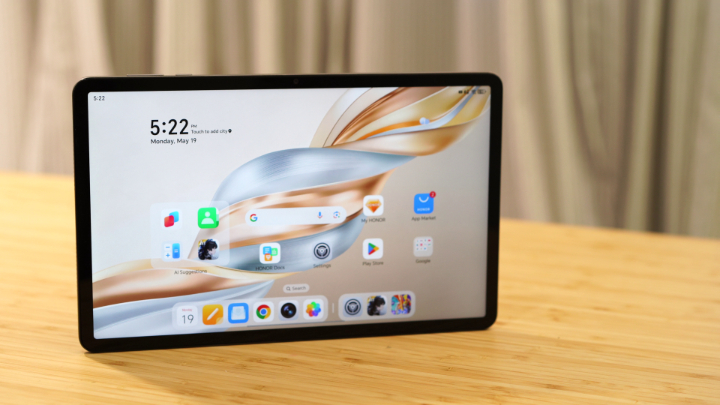
Battery life is another highlight. With an 8300mAh battery under the hood, the Pad X9a can easily get you through a full day of light to moderate usage. Video playback, web browsing, and ebook reading barely put a dent in the battery. Our benchmark testing clocked in around 13 hours and 41 minutes on PCMark’s battery test, which is very respectable.
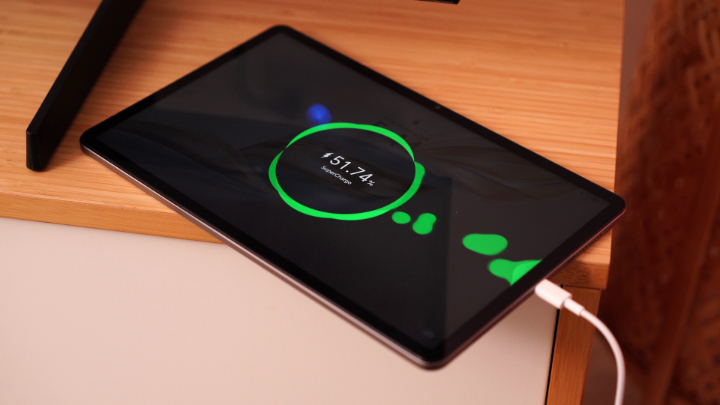
Charging is handled via a 35W adapter. It’s not blazing fast, but it fills the battery in roughly two hours from zero. That’s manageable for overnight charging or quick top-ups during breaks. There’s no wireless charging, which is expected in this segment.
For users who want a reliable device for extended reading, video watching, or study sessions without worrying about plugging in frequently, the battery life is one of this tablet’s strongest points.
Price and Final Thoughts
The HONOR Pad X9a starts at PHP 10,999 for the Wi-Fi-only model, while the bundle with a Bluetooth keyboard goes for PHP 11,999. That puts it firmly in the entry-level tablet segment, where competition is fierce and compromises are expected. It’s not a tablet that aims to replace a laptop or rival flagship devices, but it excels in the areas that matter most to casual users and students.

You get a sharp 2.5K display with a smooth 120Hz refresh rate, which makes reading, browsing, and watching videos a joy. The large 8300mAh battery delivers excellent endurance, easily lasting a full day or more. The design is lightweight and sleek, making it comfortable to use for long sessions, and the quad speakers provide enjoyable audio for media playback. MagicOS 9 on Android 15 is clean, responsive, and refreshingly free of bloat, and the Snapdragon 685 chipset handles everyday tasks reliably.
However, it does fall short in some areas. There’s no stylus support or productivity mode, which limits its potential for creative or advanced work tasks. The cameras are just average, the brightness could be better for outdoor use, and you miss out on features like GPS, NFC, and a headphone jack. It also isn’t well-suited for heavy multitasking or demanding 3D games.

In the end, the HONOR Pad X9a is a well-rounded budget tablet that gets the core experience right. It’s not trying to be a high-end productivity device or a gaming powerhouse. Instead, it nails the basics—media consumption, reading, light work, and casual use—and does so in a sleek and accessible package. For under 12,000 pesos, that’s a win in our book.
What we like:
- Sharp 11.5-inch 2.5K display with 120Hz refresh rate
- Long-lasting 8300mAh battery with solid screen-on time
- Decent price tag
What we don’t like:
- No stylus support or desktop productivity mode
- Limited gaming performance on demanding titles
- Display could be brighter for outdoor use
HONOR Pad X9a specs:
11.5-inch 2.5K IPS LCD
1504 x 2508 pixel, 120Hz refresh rate
400 nits peak brightness
Qualcomm Snapdragon 685 4G
6nm, octa-core, up to 2.8GHz
6GB RAM
128GB storage
8MP f/2.0 single rear camera, AF
5MP f/2.2 selfie shooter
4G LTE (optional)
Wi-Fi
Bluetooth 5.1
USB Type-C
Quad speakers
MagicOS 9.0, Android 15
8300mAh battery
35W charging (wired)
267.3 x 167.4 x 6.77 mm
475g (Wi-Fi), 480g (LTE)
Gray (colorway)





0 Comments
Leave a Reply