infinix x yugatech

Microsoft Surface Pro in the flesh, first impressions

Listen to article

We received this review unit of the Microsoft Surface Pro last week but we only got to unbox it this week-end. We also got to compare it with our own MS Surface RT (which we reviewed earlier here).

The Surface Pro is the version which closely resembles a full-blown laptop with a powerful Intel Core i5 processor under the hood. The device can be technically considered an ultrabook once you pair it with the keyboard cover.

Based on the design and form factor, the Surface Pro is very similar to the Surface RT although the Pro is slightly thicker than the RT and it comes with a dedicated stylus, just in case you want to draw or sketch on the touchscreen display.
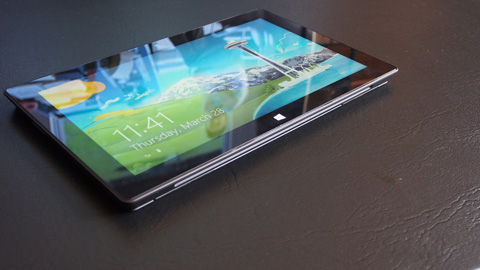
There are two variants of the Surface Pro — one with 64GB SSD and the other with 128GB.

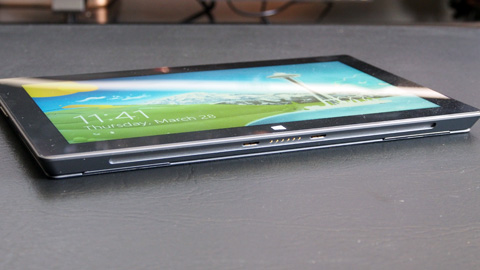
Microsoft Surface Pro specs:
10-inch ClearType HD Display @ 1920×1080 pixels
Intel Core i5
Intel HD Graphics 4000
4GB DDR3 RAM
128GB SSD
WiFi 802.11 b/g/n
Bluetooth 4.0
Rear camera @ 720p
Front-facing webcam @ 720p
USB 3.0 port
microSDXC card slot
Headset jack
Mini DisplayPort
42 W-h battery
Windows 8 Pro
10.81 x 6.81 x 0.53 inches (dimensions)
2lbs (weight)

The pen/stylus comes with the box while the keyboard attachment and cover is sold separately.

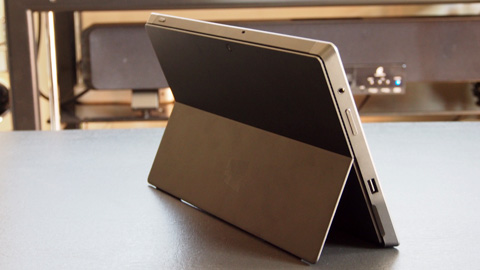
The tablet has a built-in metal stand at the back which flips out to give you a free-standing position at about 135-degrees angle. The extra sheet of metal that connects with the stand probably serves as some sort of ventilation (the device can heat up fairly fast).
Using either the stylus, the trackpad on the cover or an external mouse (via USB or Bluetooth), the Surface Pro can basically do anything a regular laptop or ultrabook can — including some serious gaming, video and office productivity (Photoshop/Premiere) and everything else in between.

For the most part, we can theoretically say it’s a good contender for a netbook replacement and likely candidate as an alternative to an ultrabook.
Unlike the Surface RT which failed to impress us as a laptop replacement, the Surface Pro supports basically all apps and programs we run on our regular Windows machine.

We still need to spend some more time with it, use the device as a laptop replacement and observe any difference (good or bad) from this kind of setup. We will get back to you for the full review in a week or two.
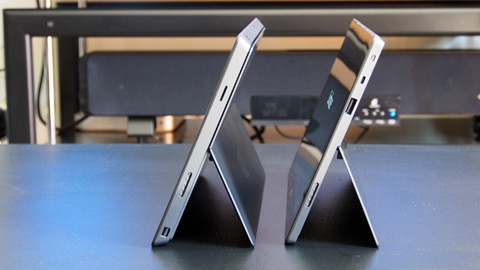
The device is not officially released here in the Philippines but there are several grey market units already selling them in the Php60k range. The review unit was lent to us by the good folks from Galleon.ph (see listing of the Surface Pro here). They have order-basis units starting at Php49k for the Core i5 model.


Frequently Asked Questions

What processor does the Microsoft Surface Pro use?
The Surface Pro uses an Intel Core i5 processor.
Does the Surface Pro come with a stylus?
Yes, the Surface Pro comes with a dedicated stylus in the box.
Is the keyboard cover included with the Surface Pro?
No, the keyboard attachment and cover are sold separately.
React to this article:
Written by
Abe Olandres

Abe Olandres

Editor-in-chief

Abe is the founder and Editor-in-Chief of YugaTech with over 20 years of experience in the technology industry. He is one of the pioneers of blogging in the country and is considered by many as the Father of Tech Blogging in the Philippines.

View all posts by Abe Olandres →

47 Comments

GA
game trainers · 13 years ago

Just got myself one thanks for the review so far am enjoying everything.

Reply
MA
marvin · 13 years ago

Bakit ba ang dami ditong nagpapanggap na alam nila yung product… Have you guys even tried using it? I think the price is fair and to the people saying that you can buy a gaming pc for the same price mejo stupid and argument nyo. What your paying for here is portability, design and build quality. Kung trip nyo yung mga gaming laptops na saksakan ng panget at super bigat na less than 4 hrs and battery life then this is really not the device for you. And please stop using games as a benchmark for devices. Di naman yun and focus nung product. Kung razer to or alienware then by all means, but this device was not made to run games. And the gamers who will buy this device have their gaming consoles for that.

Reply
JC
jcruze057 · 13 years ago

if the screen size is at least 17″, I might consider buying it.

Reply
JC
jcruze057 · 13 years ago

bakit walang hdmi port? sayang naman

Reply
NE
neil · 13 years ago

what is your reason for buying this?
if your reason for owning one is for productivity, nothing beats the full keyboard on a laptop…
if it is gaming, buy the razer edge or better yet build your own gaming desktop…
if it is portability, there are other windows 8 tablets out there that is lighter with similar specs for a lower price …

Reply
IY
Iyan Sommerset · 13 years ago

As a full mobile/netbook replacement, seems to show promise. Ouch on the prospective price tag but the bigger question is – can it run/dual-boot Ubuntu? Seems like here’s finally something that can use the Unity shell to its fullest. I’m worried about the HD4000 though – Intel’s previous foray into graphics – the 3600 was a rebranded PowerVR SGX545 which caused me a helluvalot of headaches when trying different distros of linux on that chipset.

Reply
VS
vslayer · 13 years ago

laging tandaan ito po ay FULLY PLEGDED PC magagawa po dito ang lhat ng nagagawa sa ipad at sa nexus 10 and even more …. Talagang it comes with a price but i think its worth it naman .. bkit .. nagagawa bang mg dota 2 sa ipad o adobe photoshop …

Reply
PO
Potato · 13 years ago

walang graphics card, bulok ang windows 8, hindi upgradable, fail design, i5 lang hindi i7, short battery Life, etc.

AB
abuzalzal · 13 years ago

For the hefty price…you can pretty much buy a gaming notebook or an ultrabook with a much much bigger storage space.. the Surface’s so called “portability’ factor is pretty much non existent since sim bigat lang ito ng karamihang ultrabooks…what’s even worse., 4 hours lang yaya ang battery life neto

..the Surface pro I believe has a built in crap GPU that won’t run most direct x games smoothly….

All in one device? Not even close…for 60k id rather buy a note 8 PLUS an ultrabook….may sukli ka pang pambili ng 3 terabyte storage lol

FAIL yet again from MS

SA
saynotobobos · 13 years ago

@Potato and @abuzalzal
Get ready to hang your heads in shame for saying that Surface Pro won’t play hardcore games.

Go watch these videos that will prove you’re both wrong:
http://www.youtube.com/watch?v=YbyWq8jPTxM
http://www.youtube.com/watch?v=wq31Ryi9OWw

PO
Potato · 13 years ago

framerates?

AB
abuzalzal · 13 years ago

@saynotobobos

My old pentium 4 pc can run COD as well …. ang tanong..playable ba? Sa youtube you ca NOT discern a 20fps vs a 60fps game and I’m willing to bet my balls Counter Strike lang ang playable dito. …and good luck keeping it cool for an hour of intensive gaming. …a device that is NOT intended for gaming will brake down easily….now tell me, worth it ba yung asking price ng Microsoft?

XN
xnet5 · 13 years ago

Dunno if you guys even bothered to watch the video, it clearly states that the game ran fine at 60FPS at 1366×768 resolution.

Looks great considering the small screen too. I’ll agree this isn’t intended for gaming, but I’m impressed that it’s able to do so. Not so impressed with the price however, but hey, its microsoft for ya.

SA
saynotobobos · 13 years ago

@abuzalzal
COD:BO2 runs on 60fps on Microsoft Surface Pro. You said you bet your balls, right? You lost the bet, surrender your balls and get ready to be castrated. Oh there’s more, prepare to hang your head in shame because you’re totally wrong that Surface Pro cannot run hardcore games.

And please learn how to do your homework before posting senseless crap on whether COMPUTER X will run GAME A properly.

AB
abuzalzal · 13 years ago

Lalangawin to sa Pinas. ..mahal at walang appeal

Reply
DI
direk opang · 13 years ago

bilhin ko na to cash!!! wala kasi akong pamaypay sa bahay e

Reply
JU
Justin · 13 years ago

Any corny mo, brad. Di ka na lang sana humirit.

AS
aso · 13 years ago

Sino ang bibili nito dito sa Pinas? LOL. Mag ultrabook na lang kayo.

Reply
HE
Hehehe · 13 years ago

The pen/stylus *comes included* in the box while the keyboard attachment and cover is sold separately.

Parang redundant…

-comes with the box; included in the box

Reply
JR
Jron · 13 years ago

Grammar Nazzi strikes again.

LA
Latest Game Trainers · 13 years ago

Microsoft surface pro really looks slim and light weight. What’s the price of this?

Reply
JE
Jeffrey Siy · 13 years ago

Leave a Reply

Loading next article...