
Google は、⟦PH1⟧ デバイス向けに Google Map の世界情報へのアクセスを便利にする3つの新しい方法を展開しています。

Live location from iMessage. According to Google, users can tap on the Google Maps button in iMessage and would then have their location shared for the defaulted one hour, with the option to extend it up to three days. To end the share, users can simply tap the "stop" button on the thumbnail.

One of Google Maps' features is the ability to see live traffic conditions in an area. With the new nearby traffic widget, users can access this information for their current location right on their homescreen.
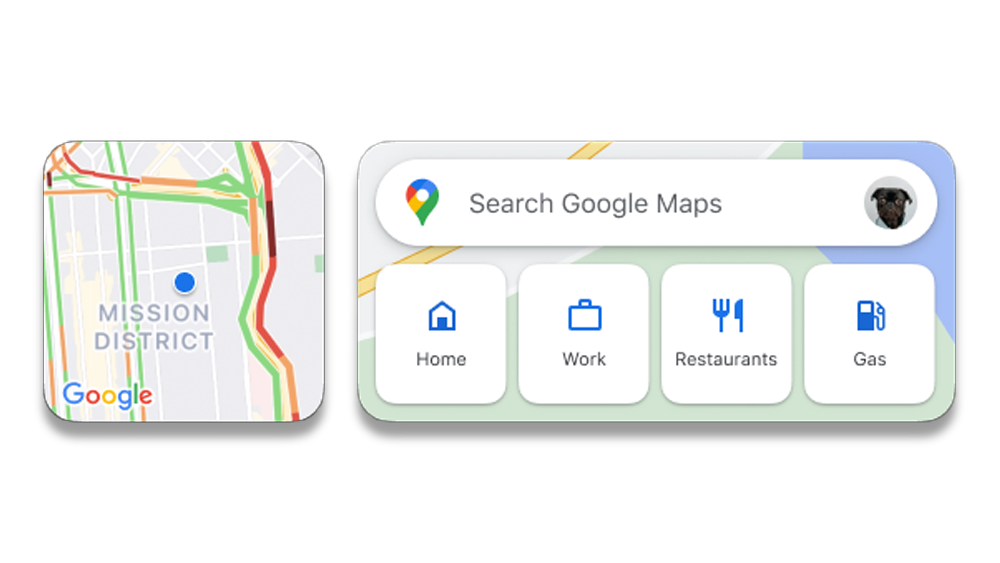
ウィジェットをインストールするには、App Store から最新の Google Maps アプリをダウンロードしていることを確認してください。
1. From the home screen, touch and hold a widget or an empty area until the apps jiggle.
2. In the upper-left corner, tap the Add button.
3. Search for and Tap the Google Maps app.
4. Swipe to select a widget, then Add Widget.

ダークモードはGoogle Maps for iOSで、数週間以内にロールアウトされ、ユーザーの目を休ませたりバッテリーを節約したりします。オンにするには、設定に移動し、ダークモードをタップして「オン」を選択してください。

Google Maps' newest features will be available for everyone on iOS this month.
Source: Google




0 Comments
Leave a Reply