Facebook ay ngayong nagpapalabas ng isang katangian para sa karagdagang seguridad para sa mga gumagamit nito sa Pilipinas na tinatawag na Facebook Protect.
Ang Facebook ay naglulunsad ng feature na ito na voluntary para sa mga gumagamit na may malawak na abot, maraming tagasunod, at dinisenyo rin para sa mga kandidato sa eleksyon, kanilang mga kampanya, at mga naitatag na opisyal. Ang Facebook Protect ay nagbibigay ng karagdagang seguridad para sa mga account at pahina ng mga gumagamit, at sa pamamagitan ng pag-enroll, ang mga account ay may mas matibay na proteksyon tulad ng two-factor authentication, habang ang mga pahina ng gumagamit ay magsisimulang monitorin para sa posibleng banta ng hacking.
Kung ang mga gumagamit ay hindi nakatanggap ng paalala upang i-activate ang Facebook Protect, lahat na kailangan nilang gawin ay pumunta sa Settings & Privacy sa kanilang Facebook app, i-tap ang Settings, i-tap ang Password and Security, at i-tap ang Facebook Protect kung ito ay naka-off.
Ang kailangan ng lahat ay sundin ang mga hakbang upang i-activate ang karagdagang mga pagsukat sa seguridad tulad ng two-factor authentication.
Facebook Protect ay kasalukuyang pinapalaganap sa buong mundo at available na ngayon sa Pilipinas. Para sa karagdagang impormasyon, tingnan ang pormal na blog post ng Facebook.
Sanggunian: Facebook
Frequently Asked Questions
Who can enroll in Facebook Protect in the Philippines?+
The feature is voluntary for users with a wide reach, many followers, election candidates, their campaigns, and elected officials.
What security benefits does Facebook Protect give to enrolled accounts?+
Enrolled accounts receive stronger protections, including two‑factor authentication and monitoring of pages for potential hacking threats.
What must Page admins do when their page is enrolled in Facebook Protect?+
Page admins must complete Page Publishing Authorization, secure their accounts with two‑factor authentication, confirm their primary country, and manage the page from a single real‑name profile.
It’s not voluntary as the FB or this article said. Been forced to enable it or else they lock my account until I turn it on. MFA is already enabled on my end so why the additional security?



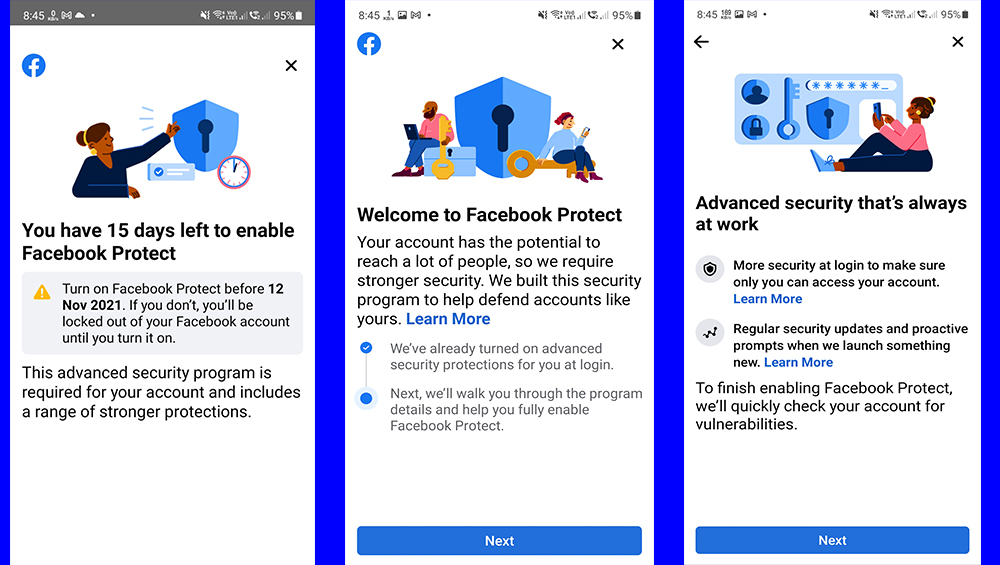





It’s not voluntary as the FB or this article said. Been forced to enable it or else they lock my account until I turn it on. MFA is already enabled on my end so why the additional security?