


Found out the other day that Google has released a code for its Adsense for Search which allows publishers to display search results on-page (used to be off-page that pops out on a new browser window.)
From the AdSense blog, they provided instructions on how to implement this.
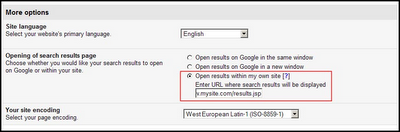
To use it, just choose the “Open results within my own site” radio button when you’re generating your AdSense for search code. You’ll also need to identify the page where you’d like to display your search results.
We’ll give you two sets of code: one for the search box, and one for search results. Place the first set on a page where you’d like the search box to appear, and the second set on the page you’d like the search results to appear. Whenever users perform searches on your AdSense for search box, they’ll be directed to the page on which you placed the search results code.
This new feature could potentially increase CTR for search. I’ll try using it later and compare their performace from previous month’s data.







1 Comment
Leave a Reply