

Consistent, reliable internet connection has become a non-negotiable in today’s day and age. Staying online is needed to live, whether it be for work or for general means of entertainment.
To address this, PLDT Home launched the Always On service last year. Its purpose is fairly simple, to alleviate any inconveniences brought by sudden loss of internet connection.
About The Device
The PLDT Home Always On is powered by Wi-Fi 6, a relatively common standard adopted globally.
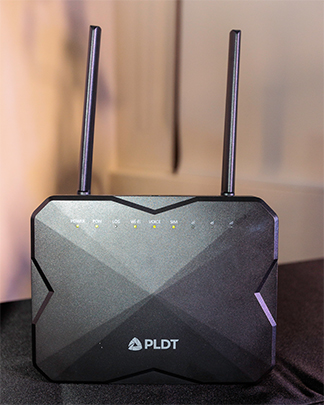
The modem can deliver internet speeds of up to 1 Gbps. Your internet speeds, of course, depend on the Fiber plan you’re subscribed to.
It works by combining fiber and LTE, switching automatically to 4G LTE once a tech hiccup has been incurred.
It addresses problems such as loss of signal (LOS), cable cuts, severed connectors, or other infrastructure-related issues. While a fiber optic internet does come with fast speeds, it’s fairly sensitive to mishaps relative to the Philippine infrastructure, which most of the time is unexpected and uncontrollable by internet service providers.
Likewise, it switches back to fiber once the connection has been restored. This streamlines measures for reliable connection, making sure that your household or workplace stays online.
Always On, Even During Internet Outages
The most common culprits of connection errors include cable theft, roadwork, rodents that destroy fiber wires, and inclement or unfavorable weather.

Just recently, we experienced Typhoon Rai or Super Typhoon Odette. The country generally goes through roughly 20 tropical cyclones annually.
That being said, strong winds, falling trees, and floods are some root causes for network issues. These damage to fiber lines, undersea cables, and equates to extended downtime.
The PLDT Home Always On service amends these issues. It helps households and offices stay online, despite unforeseen circumstances.
We can definitely see the likes of students and professionals working from home making the most out of the device. It’s built to be a reliable solution, helping you work through the day sensibly.

It doesn’t stop there either, the modem is also usable even under power outages. All you need is a reliable alternative power source like a generator or a power bank with DC converter, and your modem will work well during these situations. Of course, this requires the right setup.
Modems need 12V to operate, while a standard power bank has a 5V output. What you can do here is use a USB-to-DC Cable Converter, boosting the 5V output to meet the required power.

We recommend readers to pick up a power bank with a capacity of at least 20,000mAh to pump out an extended runtime. That said, check out Promate’s power banks at https://bit.ly/NUpwrbnk for the best options.
Considering more than one power bank on hand is also good, as this issue may differ depending on how many people in the house are online, the number of connected devices, etc.
As a disclaimer though, connecting the modem to a power bank isn’t always applicable for power outages during typhoons or calamities. It’s nice to have to get out of a pinch when you’re working from home, but we advise you to relax once you save your work progress.
We believe the best use case for the modem is for scheduled brownouts. This is for when your neighborhood or building needs some maintenance done for electrical wiring or posts.
Performance
In terms of performance, we found that the modem generally gave favorable and consistent speeds in terms of upload and download.
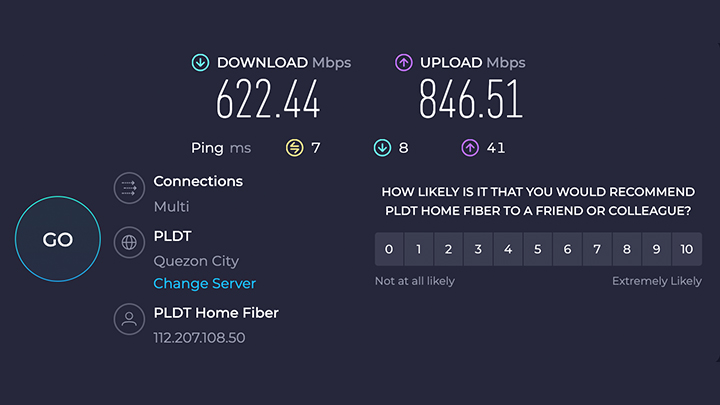
This depended on whether we leveraged the fiber connection or the 4G LTE connection. Above, readers can find that we had a download speed of 622.44 Mbps and an upload speed of 846.51 Mbps.
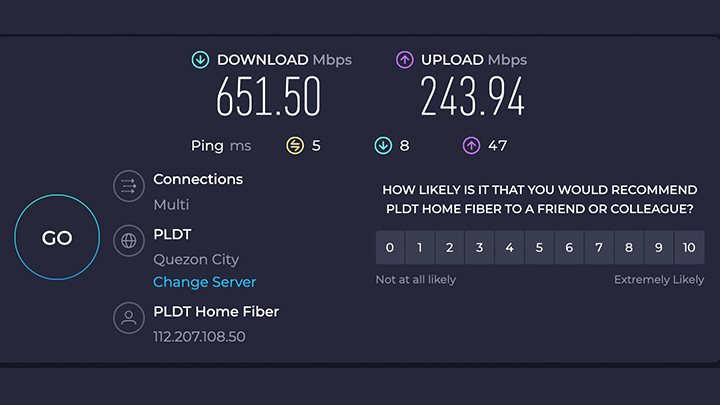
Meanwhile, the next image shows a download speed of 651.50 Mbps and an upload speed of 243.94 Mbps. The prior image was taken with the fiber connection, while the one above is with 4G connectivity.
Strangely, the 4G connection yielded a higher download speed, albeit negligible. However, the real difference is on the upload speed. It’s a huge swing in favor of the fiber connection. Of course, fiber connection is the most ideal for high bandwidth activities.
Take note though, that wireless signal may depend on your area. Best to check as well if your area is serviceable to ensure that both fixed and wireless signal work well in your area. It’s also best to check and identify the best spot inside the home where you have the strongest LTE signal.
Price, Where To Get, and Verdict
The PLDT Home Always On will cost subscribers an add-on fee of PHP 299 per month, which covers installation, activation, and monthly service fees for 36 months or 3 years. After that period, subscribers will just have to pay PHP 149 for monthly service fees.
Take note, the cost will come on top of your current monthly subscription. For example, if your subscription costs PHP 1,699 monthly, just add P299 for the Always On service.
Of course, the final bill should depend on what subscription plan you have. Getting the Always On service is pretty standard as well. For more information, readers could always click here for more about Always On.
Some users actually got the add-on through a marketing email. Another thing of note here is that part of the application process checks if you live in a city where the device has rolled out.

They’ll check if you have reliable signal coverage from Smart, whose towers provide the 4G LTE data for the modem. Once you’re set, PLDT staff will come to install the modem and you’re pretty much set.
Generally, the PLDT Home Always On service is a nice add-on. It’s a great option should you need a back-up plan for planned power outages and unexpected service disruptions.
It doesn’t have a data cap for when it switches to 4G LTE. This means it offers the same unlimited data as the regular fiber optic connection. Now, that’s a good deal!







0 Comments
Leave a Reply