

HUAWEI MatePad 12 X (2026) Review



A few days ago during the much-awaited showing of Avengers: Infinity War, we took a quick look at a device inspired by the jaw-dropping movie franchise — The Acer Swift 3: Iron Man Edition. Designed for Marvel and Iron Man fans, can the Swift 3 live up to its branding? Well, today we’ll know the answer to that question.
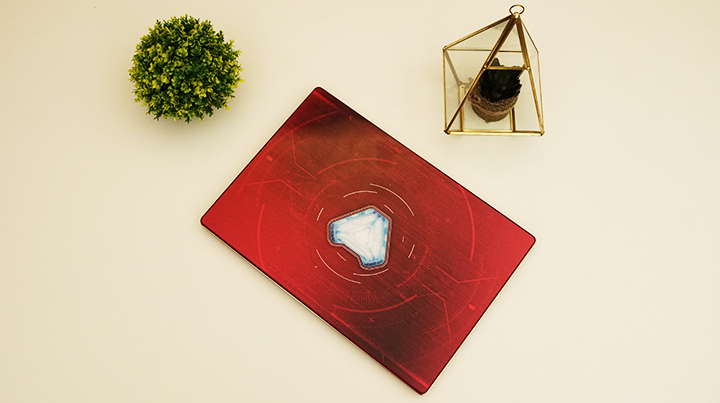
The Acer Swift 3: Iron Man edition is encased in a brushed aluminum chassis with the signature Iron Man red color. There are themed designs placed all over the laptop including a Marvel sticker right beside the fingerprint scanner, and the Avengers logo across the right palm rest. The lid was also given special attention as it features Iron Man’s arc reactor, though we report with a heavy heart that it doesn’t light up along with the laptop, which would’ve added a bit more flair. It is, however, protected by an acrylic sheet that adds a bit of style and gloss to the panel, although it easily attracts fingerprints and smudges.

The laptop itself is well-built. It has some screen flex though not too alarming. The keyboard deck is also solid as a rock with minimal flex on all sides. The hinges too, are well-made as the display panel can even lay flat on the floor. While the Swift series is known to be one of the thinnest laptops on the market, the Swift 3 doesn’t seem to follow that trend. It’s by no means thick, although its brethren and other competitors are a bit thinner. In any case, it’s still a sturdy thin and light that can easily be carried around. Not to mention, it will attract attention due to the flashy Iron Man design.
Now, on to the keyboard and trackpad. Being a 14-inch laptop, the Swift 3 has a TKL (tenkeyless, no Numpad) keyboard layout. Travel distance is good and tactile feedback is excellent, making it quite a joy to type on. Backlighting is present and is also adjustable. We do get, however, a pretty compressed arrow key layout, which may cause wrong key presses at times.

The Swift 3 was given a clickpad, meaning you can press the entire pad to register actions. The bottom part still houses buttons for the left and right clicks, if you’re more accustomed to that kind of setup. While the keyboard was a good experience, the same cannot be said with the trackpad. It’s because of the matte-like finish that makes gliding and gestures particularly hard to do as it tends to sometimes cause friction with your fingers. Clicks are okay though, and provide enough haptic feedback.
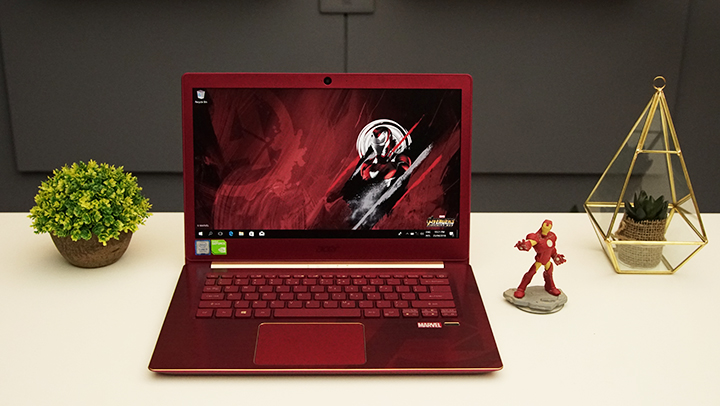
The Swift 3 is equipped with a 14-inch IPS FHD display. While the laptop can pride itself as generally thin and light, the bezels of the display are anything but. We felt like it would’ve been better if they reduced the overall thickness of the bezels to give way for more screen real-estate. Not to mention, it gives off the aura that you are using a thick device even though you are not. As for the display itself, we get the standard IPS quality — good color reproduction and accuracy along with excellent viewing angles.
For Audio, we have two standard down-firing speakers. Noticeably absent is any partnership with a major audio company, though what we do get is Acer’s own TrueHarmony technology. They’re an above average pair considering they are notebook speakers. They can get pretty loud while still maintaining clarity. The Mids and Highs too are pretty solid although, Lows are almost non-existent.
Running the software department for the Swift 3: Iron Man edition is Windows 10 Home. We get a few pre-installed applications, which are mostly Acer homebrew such as Acer Collection, Acer Care Center, and Acer documents. We also get a few games like Minecraft, Candy Crush Saga, and Bubble Witch Saga 3.

Storage-wise we only get a single 256GB SSD, which will surely get filled-up quick.

Powering the device is Intel’s latest 8th Generation i5-8250U processor paired with an NVIDIA X150 GPU and 8GB of RAM. Mundane tasks such as basic office work, browsing, and notebook navigation are a breeze. The Swift 3 can even run light to medium games at medium to high settings in its native 1080p resolution without any problem. Although, heavier games such as triple AAA titles (Witcher 3, Crysis 3, and Attack on Titan 2, among others) will bring the laptop to its knees. It can handle heavy gaming in medium to high settings, just not at its native 1080p resolution. Video and photo editing, on the other hand, is quite possible thanks to the i5-8250U quad-core processor. Check out our benchmarks below.


For I/O, we get a pretty good selection for a 14-inch device. Over to the left, we have the power input, an HDMI port, a USB 3.1 Gen1 Type-C port, two USB 3.0 Type-A ports, and a combo audio port. Over to the right, we have the Kensington lock, a USB 2.0 Type-A port, and the SD card reader. The Swift 3 is also equipped with basic connectivity options such as WiFi and Bluetooth 4.0. It even has a perfectly working fingerprint scanner, which is always a plus for that added security and convenience.

Battery life is stellar and impressive. The laptop was able to last us most of the day during light to medium tasks and about 5-6 hours of heavy usage (Mix of gaming, video and photo editing, and multitasking). We subjected the notebook to our standard video loop test (running a 1080p video in airplane mode with 50% brightness and 50% volume) where it lasted a staggering 12 hours and 37mins.
Surprisingly, for a thin and light laptop, the Swift 3 was able to keep its internal components cool. We subjected the Intel i5-8250U and Nvidia MX150 to the Prime95 and Furmark stress tests, respectively. The i5-8250U reached a max of 81°C while the MX150 capped off at 70°C, these numbers aren’t too shabby considering the laptop’s footprint.

While internal temperatures are impressive the same cannot be said for external temps. Users won’t be in any particular danger since the only parts that really heat up are away from the common contact points, though the device’s heat is still alarming. During our stress tests and heavy gaming sessions the top part of the device, near the exhaust, reached searing temperatures, enough to cause pain when touched. Apart from that, the exhaust themselves are being blocked by the hinges, resulting in the display panel heating up to the same temperatures as the main body.
Acoustics too are a bit loud and audible during heavy sessions, though it can easily be drowned out by the speakers. Still, you will, at some point, hear that notorious engine roar once the device is subjected to heavy loads.

Sadly, the special edition Acer Swift 3 falls short in truly representing Iron Man. While it does nail the look and feel of Tony Stark’s bad-ass form, it lacks the firepower and performance. The laptop though is a good fan service for Marvel fans. It has an excellent Iron Man design and feel, a good display, an enjoyable keyboard, and a good selection of ports. On the flip side, however, it has some irritating downsides like the thick bezels, the problematic trackpad, and the choked exhausts.
If you’re a true blue Marvel fan who’s looking for a thin and light device with a bit of punch then the Swift 3: Iron Man edition is a good pick. Otherwise, your Php 69,999 may be better spent at the standard Swift 3 with better overall specs or maybe even something with more powerful hardware.
Acer Swift 3 Iron Man Edition specs:
Model: SF314-53G-550F
14-inch FHD IPS display @ 1920 x 1080 pixels
Intel Core i5-8250U 1.6GHz (Turbo up to 3.4GHz) processor
NVIDIA GeForce MX150 (2GB GDDR5 VRAM) GPU
8GB LPDDR3 RAM
256GB SSD
Wi-Fi 802.11ac/a/b/g/n
Bluetooth 4.0
Windows 10
2x USB 3.0 Type-A
1x USB 3.1 Gen1 Type-C
1x USB 2.0 Type-A
1x SD card reader
1x Kensington lock
1x Combo audio port
1x HDMI
4-cell 48Whr battery
338 x 234 x 17.95 mm
1.6kg
SRP: PHP69,999
What we liked:
What we didn’t like:










Apple, Asus, Cherry Mobile, Huawei, LG, Nokia, Oppo, Samsung, Sony, Vivo, Xiaomi, Lenovo, Infinix Mobile, Pocophone, Honor, iPhone, OnePlus, Tecno, Realme, HTC, Gionee, Kata, IQ00, Redmi, Razer, CloudFone, Motorola, Panasonic, TCL, Wiko
Best Android smartphones between PHP 20,000 - 25,000
Smartphones under PHP 10,000 in the Philippines
Smartphones under PHP 12K Philippines
Best smartphones for kids under PHP 7,000
Smartphones under PHP 15,000 in the Philippines
Best Android smartphones between PHP 15,000 - 20,000
Smartphones under PHP 20,000 in the Philippines
Most affordable 5G phones in the Philippines under PHP 20K
5G smartphones in the Philippines under PHP 16K


