yugatech x infinix

SIM Unlock your Galaxy Note II

Listen to article

There are usually two ways for you to unlock your smartphone, one is to pay someone else to do it for you and the other is to do it yourself which, most of the time, requires you to do crazy stuff and may lead to bricking your phone. Luckily for SGN2 users, there’s a free and not-so-risky way to unlock their 5.5-inch handset.
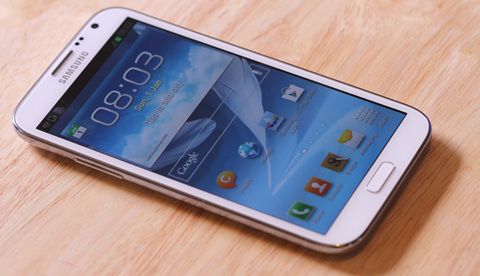

SGN2

This SIM unlock doesn’t require rocket science to pull off. Just follow these simple steps below correctly and you should be able to use any SIM card from any telco in a jiffy. Let’s begin.

1. Launch the Phone App (Dialer) on your SGN2 and key in this combination *#197328640#. After pressing those keys your phone will enter Service Mode which looks something like this:

ServiceMode

2. In the Service Mode select UMTS > Debug Screen > Phone Control > Network Lock > Options
3. Under Options, select Perso SHA256 OFF. Give it some time to do its thing, maybe around 30-45 seconds.
4. Then go back by pressing Menu button (the left soft button besides the Physical Home button) and select Back. By doing so, you should be inside the Network Lock screen.
5. Choose NW Lock NV Data INITIALLIZ, the fourth one in the selection. Give it around a minute or two to run its course.
6. After that, Reboot your device and try out a different SIM card to see if it works!

Note that in steps 3 and 5, you will not see any confirmation screen that the action was completed, so you have to be a little patient when doing this. But don’t worry if you proceeded to the next step too soon or too late as it will not have any significant effect (like bricking) on your phone. That’s the beauty of this unlock; it’s free and easy!
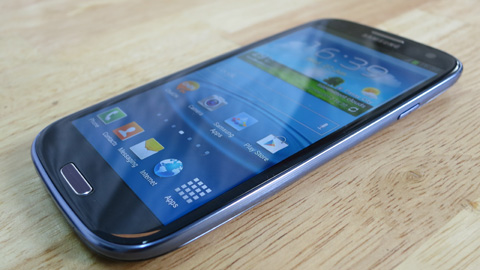
S3

According to our source, this SIM unlock procedure is also applicable to SOME models of Samsung Galaxy SIII, as long as the device is running on Jelly bean and up. It’s not guaranteed to work on our local devices but it’s worth a shot. If ever you tried it on your device, feel free to comment and tell us what happened.


Source

React to this article:
Written by
Ronnie Bulaong

This article was written by Ronnie Bulaong, a special features contributor and correspondent for YugaTech. Follow him on Twitter @turonbulaong.

View all posts by Ronnie Bulaong →

58 Comments

IE
iendgame08 · 6 years ago

*sad* i dont think it works for me it says connection provlem or invalid mmi code .. can anybody tell me why?


Reply
DE
Denva · 11 years ago

My phone says: connection problem or invalid MMI code.

Is there any other way? Pls help. Thanks.


Reply
KC
kc · 12 years ago

there is no NW Lock NV Data INITIALLIZ :( my phone is globe locked :(


Reply
JA
jazzie · 12 years ago

when i entered *#197328640# on my note2, it says invalid code… got my fone from globe…


Reply
LT
lt · 12 years ago

my brother is subscribed to globe postpaid plan with unlidata combo, he gave me the locked globe unit (dual sim unit) that comes free with his plan. is it possible to use globes prepaid internet setting for the said unit given that he is currently been using a postpaid unli setting with another android phone open line). nakatali ba yung locked unit sa existing postpaid plan.. please enlighten us guys..sayang naman kasi yung hotspot feature nung locked unit (matagal na ksi yung prepaid na yun sa akin). thanks!


Reply
BE
Ben Sy · 13 years ago

I unlocked my phone by unlock code.
Paid online
https://www.youtube.com/watch?v=nGbdePYSUuI&feature=youtube_gdata_player


Reply
JH
Jhay Acuna · 13 years ago

hi sir, SGN2 rin ung phone ko kaso ung eh 9 service mode nito. taz pagpindot ko ng UMTS RF NV 2 lang ang nakasulat which is UMTS RF NV at ang nasa baba ai NOT SUPPORTED. pde po bang pa help nito? TY


Reply
NA
Name: · 13 years ago

I only have 3 options until persha off and the 4th one doesnt appear for me


Reply
BE
Ben · 13 years ago

Is there now a solution / procedure for unlocking Samsung Note 2 locked to Globe?


Reply
MA
Maya · 13 years ago

Thanks dear.


Reply
FL
florian · 13 years ago

i follow the step 1 and 2 after i press Debug Screen > Phone Control > Network Lock but there is no OPTION menu? it say no menu is available


Reply
MA
Maye · 13 years ago

Same as @Wacky.

A friend asked me to try inserting a Globe micro sim for my SGN2 that I got from Smart. And surprisingly, it’s unlocked. Amazeballs.


Reply
JR
jrei · 13 years ago

ano po ba mangyayari kung inunlock natin ang sim-locked phone provided ng isang network..prohibited po ba yun at against sa contract mo with the network? plan ko din po kasi pero nag-aalangan kung pwede ba talaga..hindi ba’t warranty lang ng phone siguro ang mawawala at hindi naman masisira ang contract mo sa kanila as long naman na ginagamit mo yung sim at service nila at nagbabayad ka..kasi pwede naman ang postpaid na sim na yun na gamitin sa ibang handset diba, so kahit ano man mangyari sa bundled handset kasama nung plan eh pwede mong pakialaman at pwede mo ngang iunlock..tama po ba?
will appreciate all your comments to enlighten me. thank you! =)


Reply
BE
bern · 13 years ago

was successful in my sgn2 until the network control, the menu says “1.menu not exist
2.press back key 3.current command is 186.can you helpme?thanks


Reply
SO
someone you met out · 13 years ago

Tried this on a samsung s3 (t-mobile us version). It works!


Reply
CR
Crius Technologies · 13 years ago

I am really impressed by your writing style and representation of the information in your article. It’s apparent that you’ve done your research. Thank you.


Reply
WA
Wacky · 13 years ago

How come it still need to unlock? I thought that international version are unlocked? Ive got my note 2 from globe but i just inserted my sim from smart and it works! No need to unlock.


Reply
EJ
EJ · 13 years ago

I also bought my phone from Globe and brought it to America. Do you think my phone does not need to be unlocked? I’d better try to insert a sim card that is used here.


MA
Marcus · 13 years ago

I think this mostly applies to the LTE versions of the note 2. The international versions doesn’t have options under network lock.


Reply
AL
Alikabok · 13 years ago

Cool! I can see technical information like Ec/No and RSCP (Signal quality and Signal Level respectively) when I enter that code in my SGSIII.


Reply
AS
Asus_Fan · 13 years ago
Reply
RA
Ramil · 13 years ago

No luck.. Only up to step2.. After network lock NO options is shown in my note2.


Reply
AL
alainL · 13 years ago

“According to our source, this SIM unlock procedure is also applicable to SOME models of Samsung Galaxy SIII, as long as the device is running on Jelly bean and up.”

Magbasa bago mgcomment sa comment.


Reply
AD
ado · 13 years ago

Galaxy note 2 sir yung guide… not S3


Reply
RY
Ryuuji · 13 years ago

READ the WHOLE article kasi. Palibhasa sa iba, pa-skim skim lang ng article, di binabasa at iniintindi. Hay nako, mga (ibang) Pinoy nga naman.


RY
Ryuuji · 13 years ago

“…also applicable to SOME models of Samsung Galaxy SIII…”


R4
r41 · 13 years ago

lol fail ado


LO
louie · 13 years ago

tried it in my SIII and it says after selecting UMTS not supported..unit came from globe postpaid plan..


Reply
RO
Ron · 13 years ago

Typical Fandroid stupidity.


Leave a Reply

Loading next article...