


Viber gets updated to version 3.0, bringing the popular free messaging and VoIP service to both the PC and Mac.
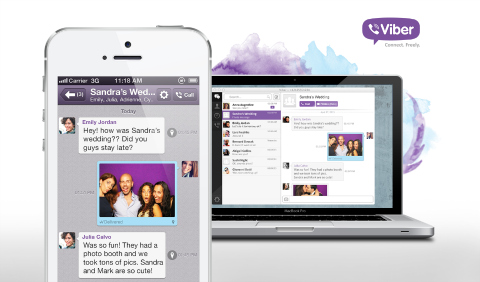
Viber is one of the most popular free cross-platform messaging and VoIP app that works on Android, iOS, Windows Phone, BlackBerry and others. With the 3.0 release, Viber adds the Windows and Mac OS to its supported platforms through Viber Desktop. Take a look at some of the key combined features below:
- Seamlessly transfer calls between Viber Desktop and the Viber app with one click or tap
- Received and Sent messages are shown on all devices, but will only “beep” on the device you are currently using
- Messages and conversations you delete from one device will be removed from all devices
On top of that, users can also make desktop-to-desktop video calls to other Viber users.
The 3.0 release also brought a redesigned and improved Viber app for Android and iOS and now includes the following features:
- Video messages
- New stickers
- Last online status
- Enhanced photo experience
- Performance improvements
- New voice engine
- Android version security fix
If you want to give Viber Desktop a try download the Windows installer here, and the Mac installer here.
{source}





In case you have problems with endless download: 1. Open C:\Users\\AppData\Local\Viber\log.log
2. Locate “MainTools.DownloadFiles: filesUrl” string and copy the URL mentioned there.
3. Just copy this URL in browser. You will download a pack.exe file. This is a self-extracting archive.
4. Put it into any folder you want to have the Viber in and run.
5. That’s it. Run Viber.exe and enjoy.